

Chiang Mai 2026: Your TDAC Digital Arrival Card Guide
Planning your 2026 Chiang Mai adventure? Learn how to effortlessly complete Thailand's mandatory TDAC Digital Arrival Card for a seamless entry. Get expert tips here!
Chiang Mai Travel: Thailand Digital Arrival Card (TDAC) Mobile Entry Form Tips
By Supypy @sue__ryan
✅ You MUST complete this in advance. If you try to fill it out in the queue, you'll be directed away.
✅ There are no paper arrival cards, so completing the digital form is mandatory.
✅ It's completely free to fill out (no payment required).
✅ You'll need to provide your accommodation address.
1. Thailand's Digital Arrival Card (TDAC)
As of May 1, 2026, all travelers entering Thailand are required to complete the Thailand Digital Arrival Card, known as TDAC.
Required for all foreign nationals (non-Thai citizens)
Can be completed up to 3 days before your arrival date
(e.g., if you arrive on a Friday, you can start filling it out from Tuesday)
Of course, this applies to your Chiang Mai trip too!

What if you forget to complete it before arrival?
If you've prepared an eSIM in advance, you can quickly register before joining the immigration queue. We highly recommend purchasing your eSIM and installing it while still in your home country as a backup plan!
⭐️ Get 20% off your eSIM purchase with USIMSA!
Now, let's dive into the TDAC website to begin your registration. One person can also register for multiple travelers.
2. Step-by-Step Guide to Filling Out the TDAC Form
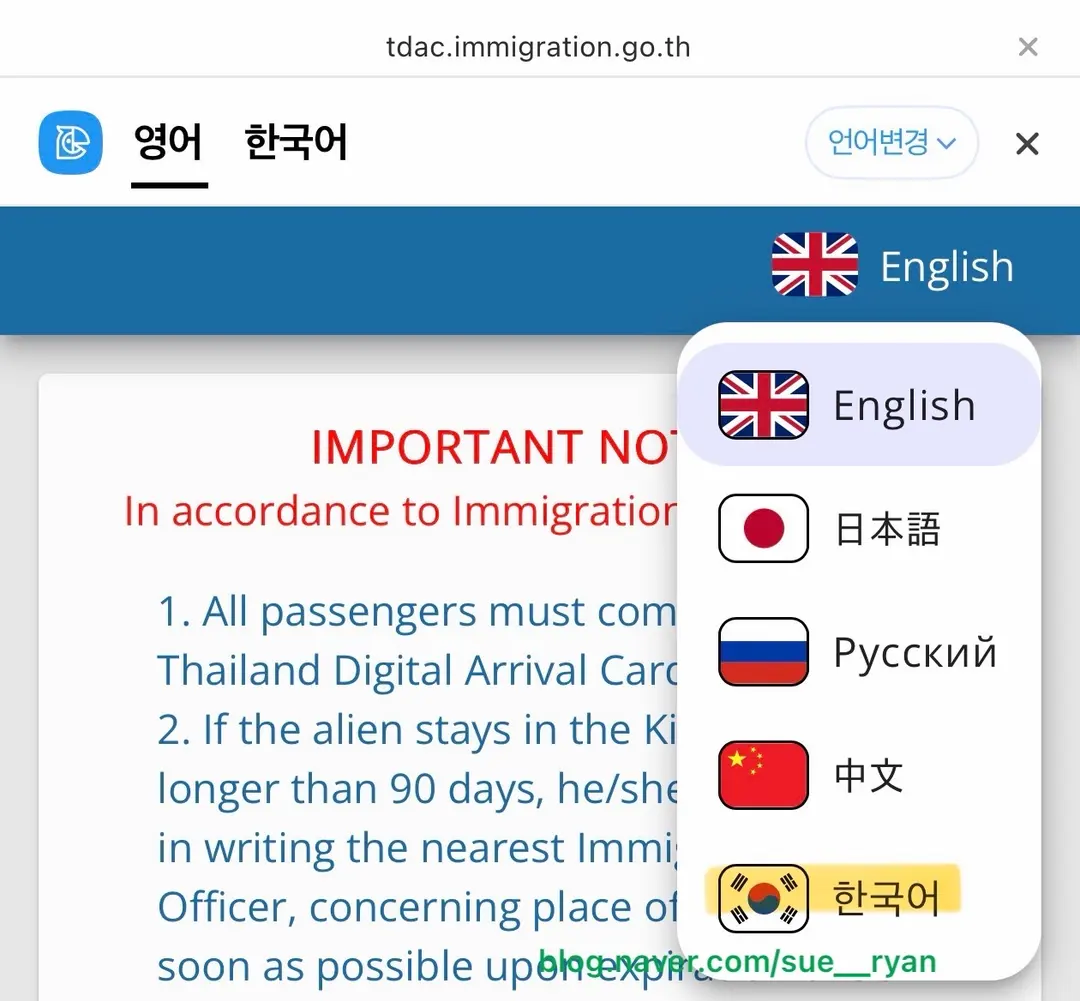
Once you're on the website, you'll find a language change option in the top right corner. You can choose English or your preferred language, but remember, all your answers to the questions must be entered in English.
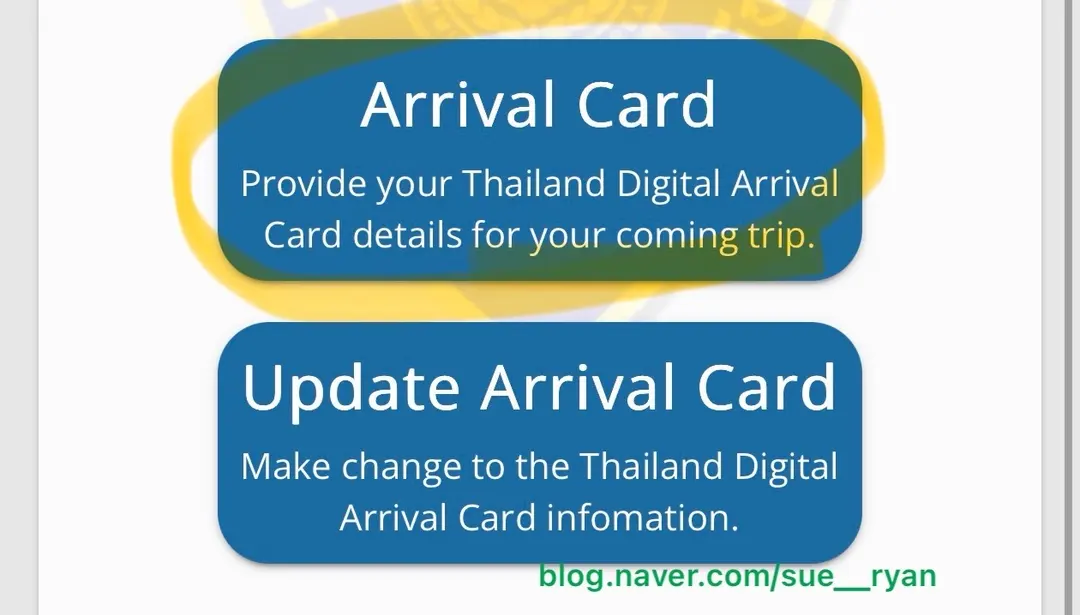
Next, click on "Fill Arrival Card" (or similar wording).
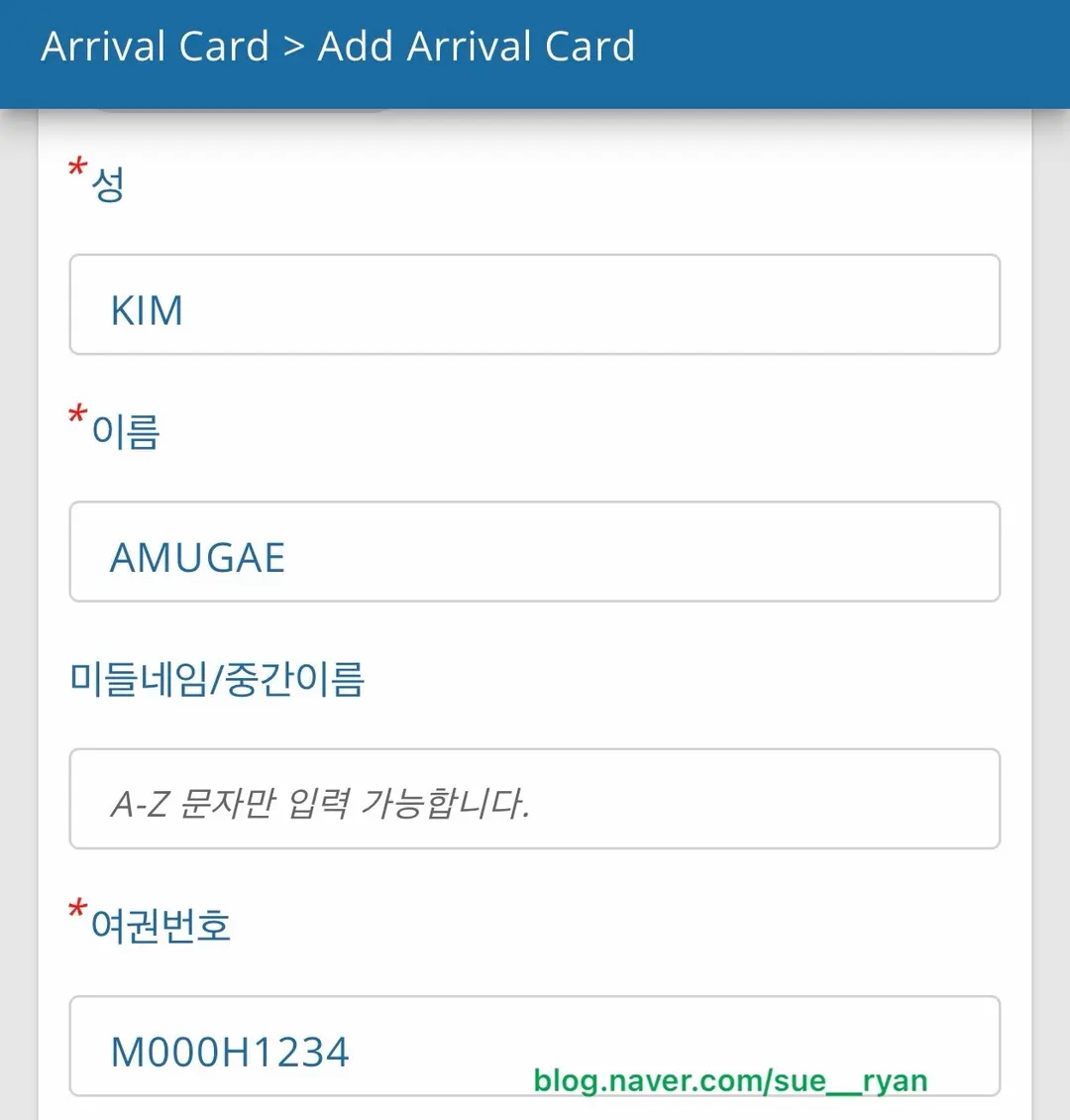
Enter your first and last names in English (lowercase letters will automatically convert to uppercase). Then, input your passport number. Immigration officials will cross-reference your QR code with your passport, so accuracy is key.
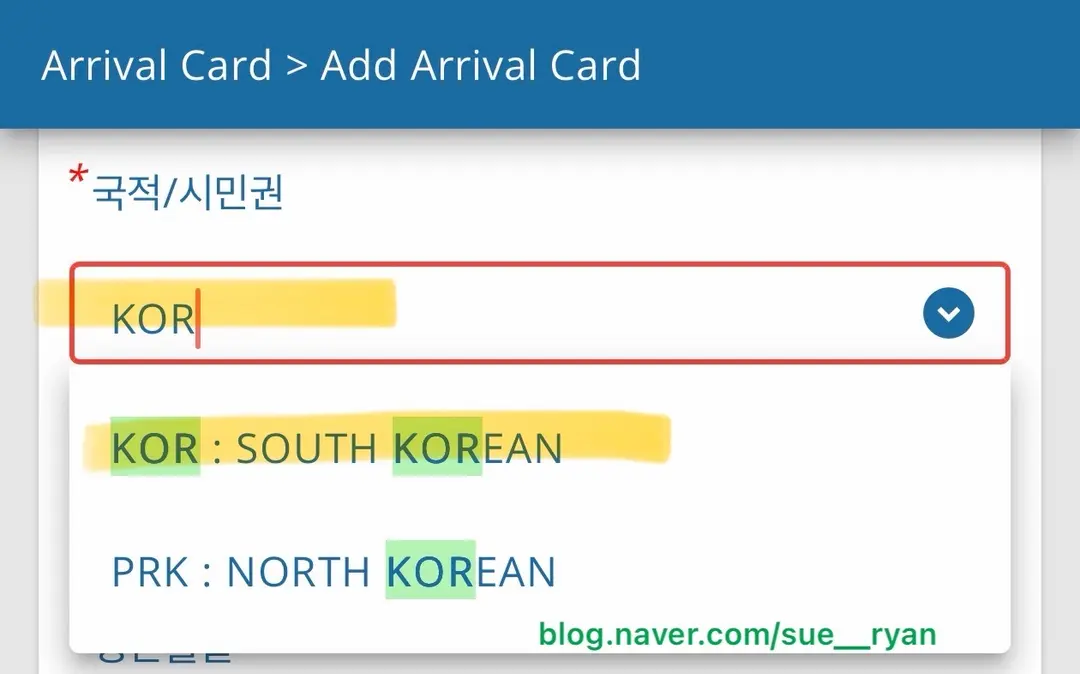
The nationality section can be a bit tricky. Start by typing "KOR" and wait a moment (there might be a slight delay for it to load). You'll then see options like "North Korea" and "South Korea." Select "South Korea" if applicable, or your respective country.
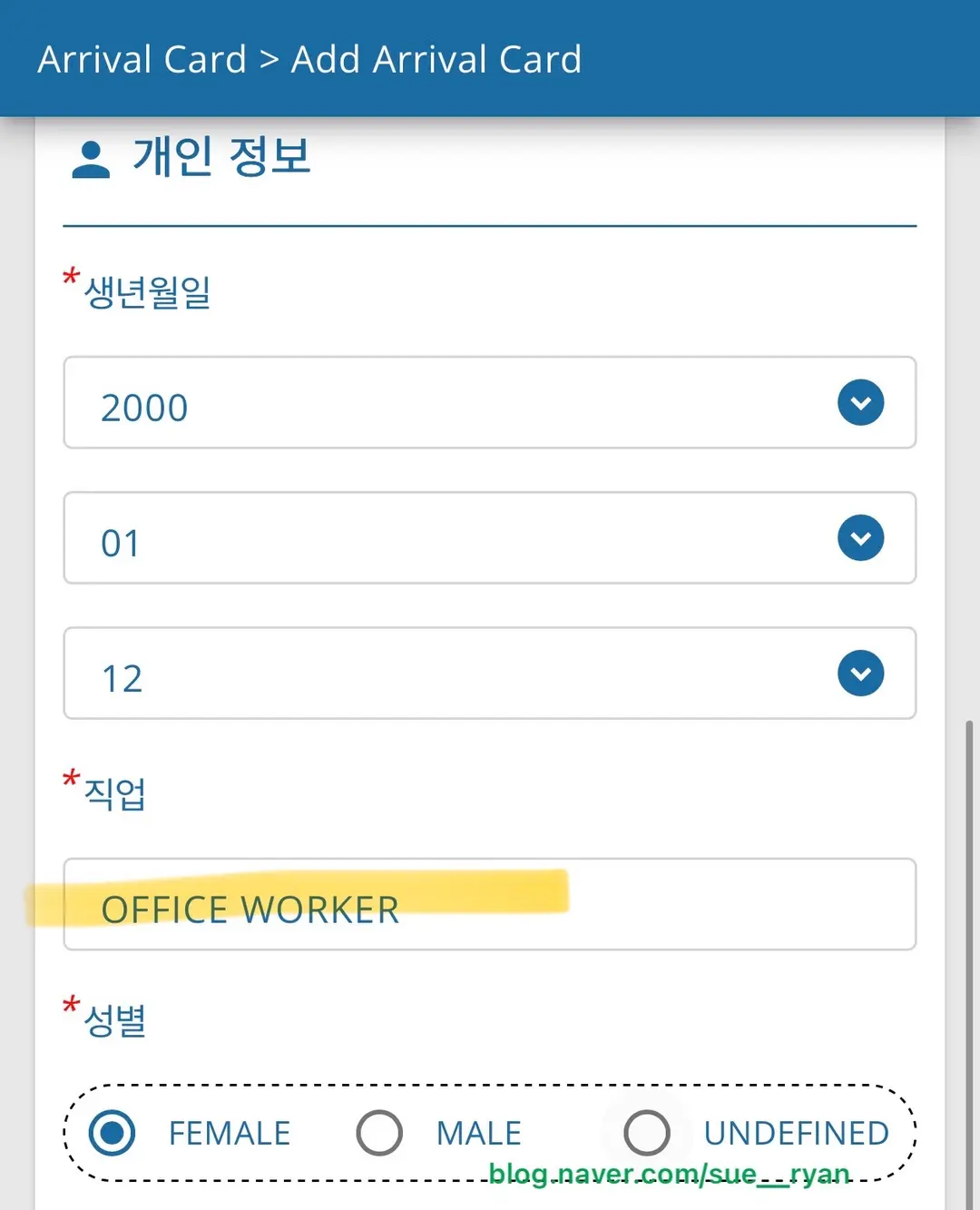
Fill in your date of birth accurately. For your occupation, most travelers will select "Student" or "Office Worker." If you're an office worker, simply write "OFFICE WORKER." Be careful not to use "OFFICIER," as this typically refers to a police officer or government official.
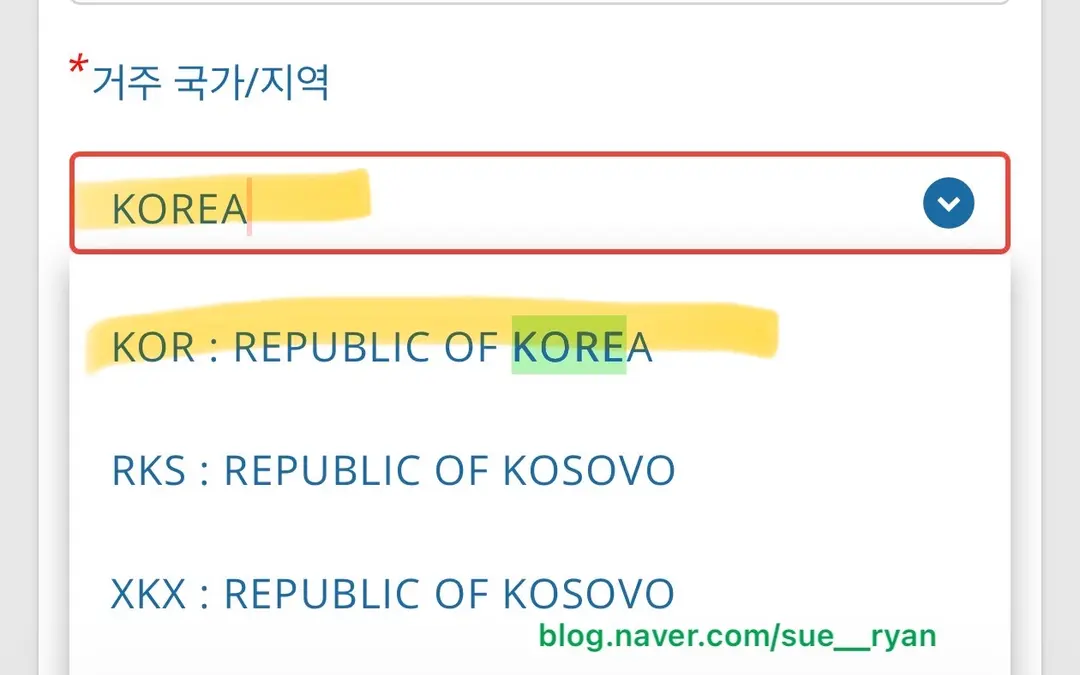
For your country of residence, type "KOR" or "KOREA" (or your country name) to search. "KOR: REPUBLIC OF KOREA" will appear (or your country's full name). Click to select it!
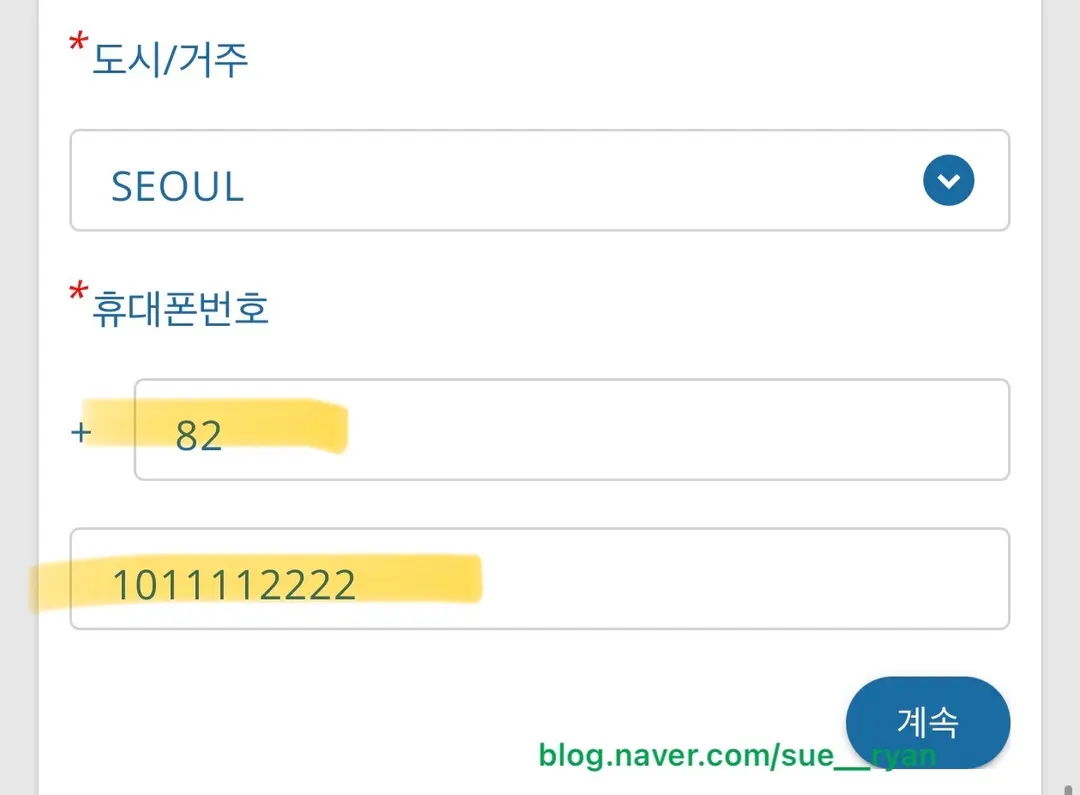
For "City," enter the name of your city (e.g., New York, Los Angeles, Chicago). For your phone number, use your country code followed by your full number (e.g., +1-XXX-XXX-XXXX for the US).
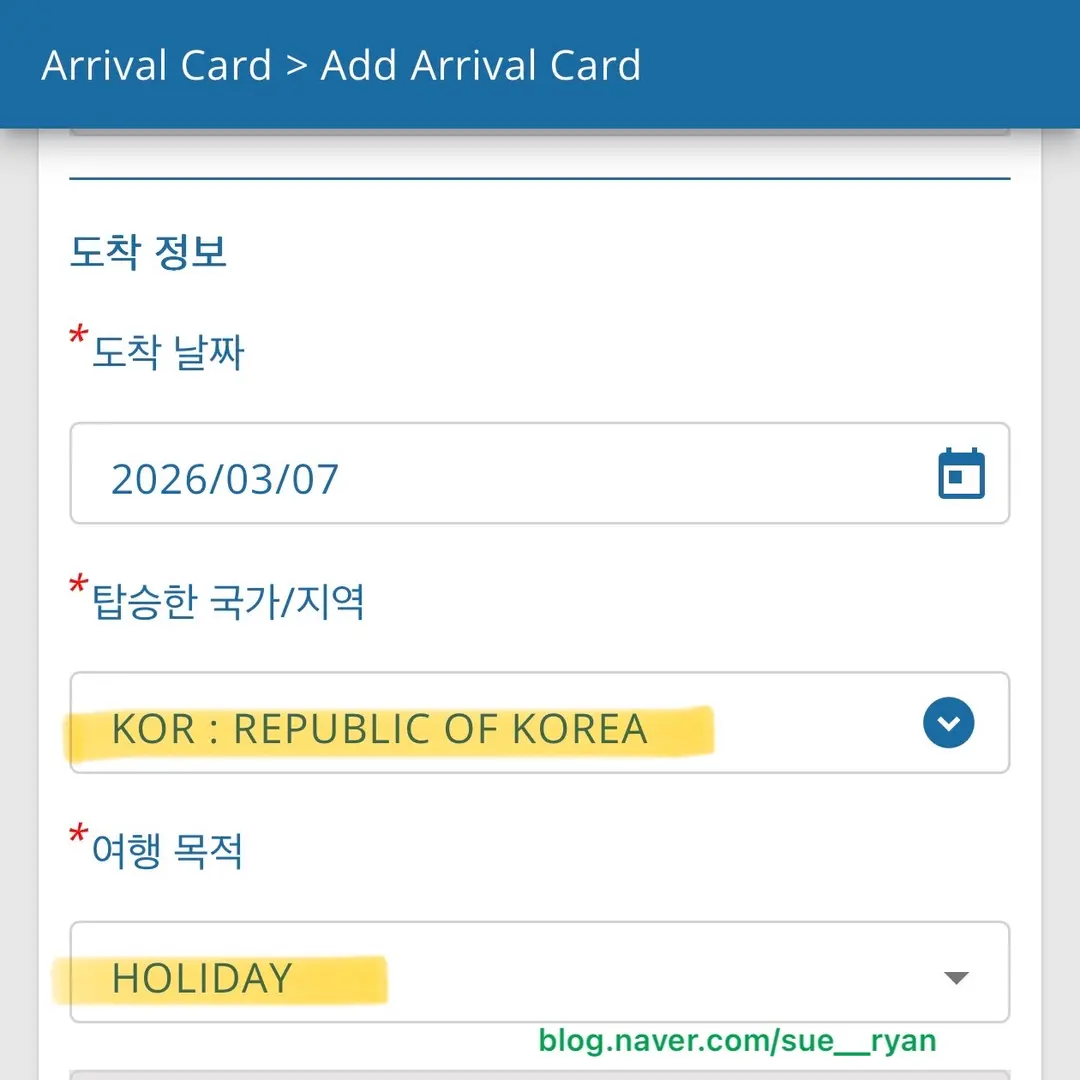
The arrival date should be the date you land in Thailand, and your boarding country should be your departure country (e.g., USA). For the purpose of travel, select "HOLIDAY" for tourism. Some sections can be a bit particular, so follow these tips closely!
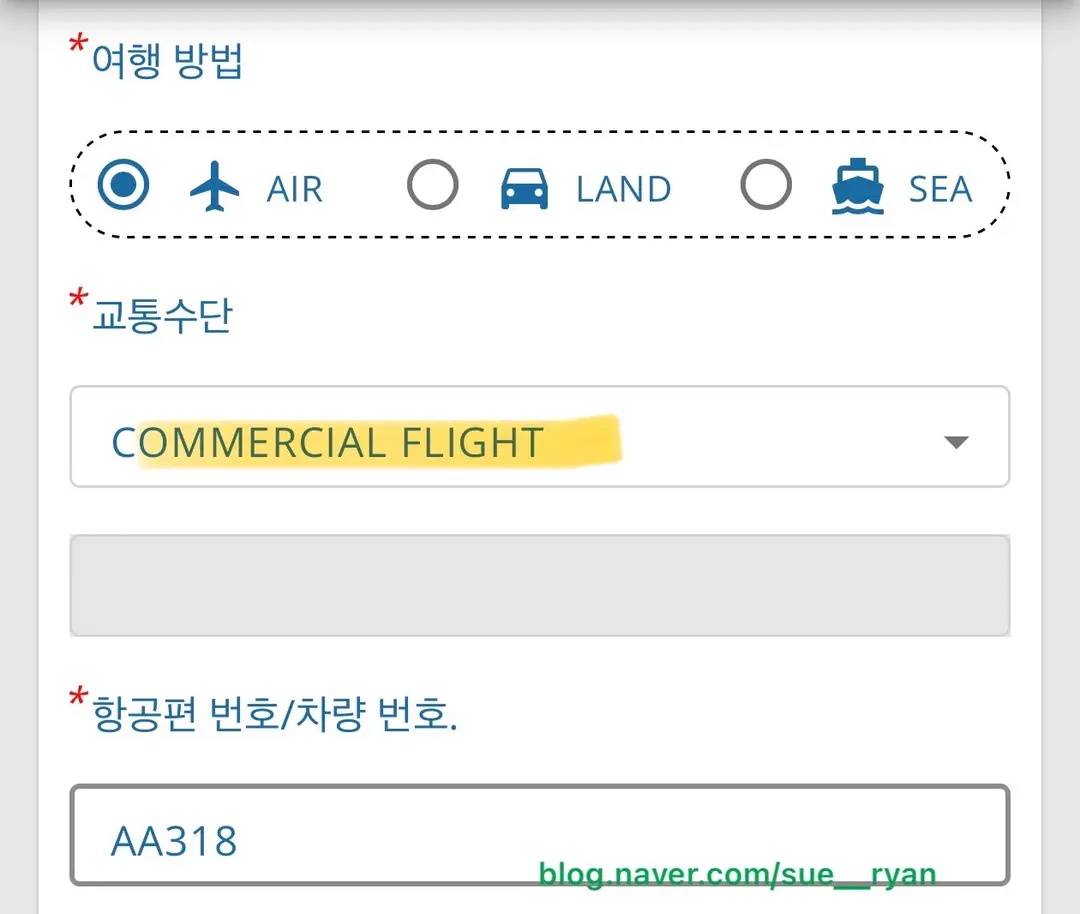
Select "AIR" for your mode of transport. Since most of us are flying on commercial airlines (unless you have a private jet!), choose "COMMERCIAL FLIGHT." Enter your flight number (e.g., UA1234 or DL5678). The departure flight below it is not mandatory, so you can leave it blank. If a pink error message pops up even after you've filled out all required fields, simply close the pop-up and click "Next" again; it usually proceeds without issue.
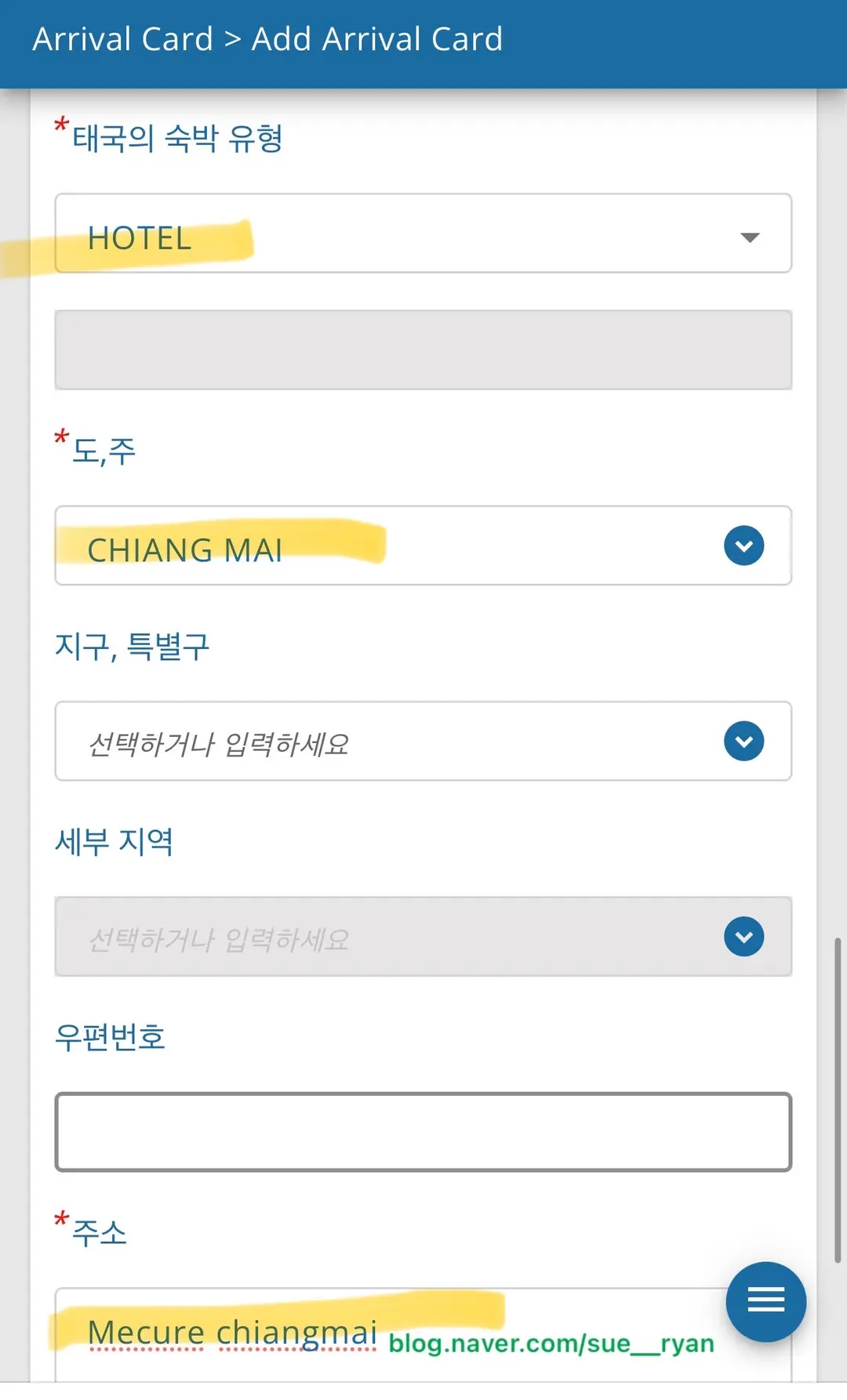
Select your accommodation type, then choose your city (e.g., Bangkok, Chiang Mai, Phuket). I personally only entered the hotel name in the detailed section and skipped the zip code. If you need to enter a full address, simply search for it on Google and copy-paste it.
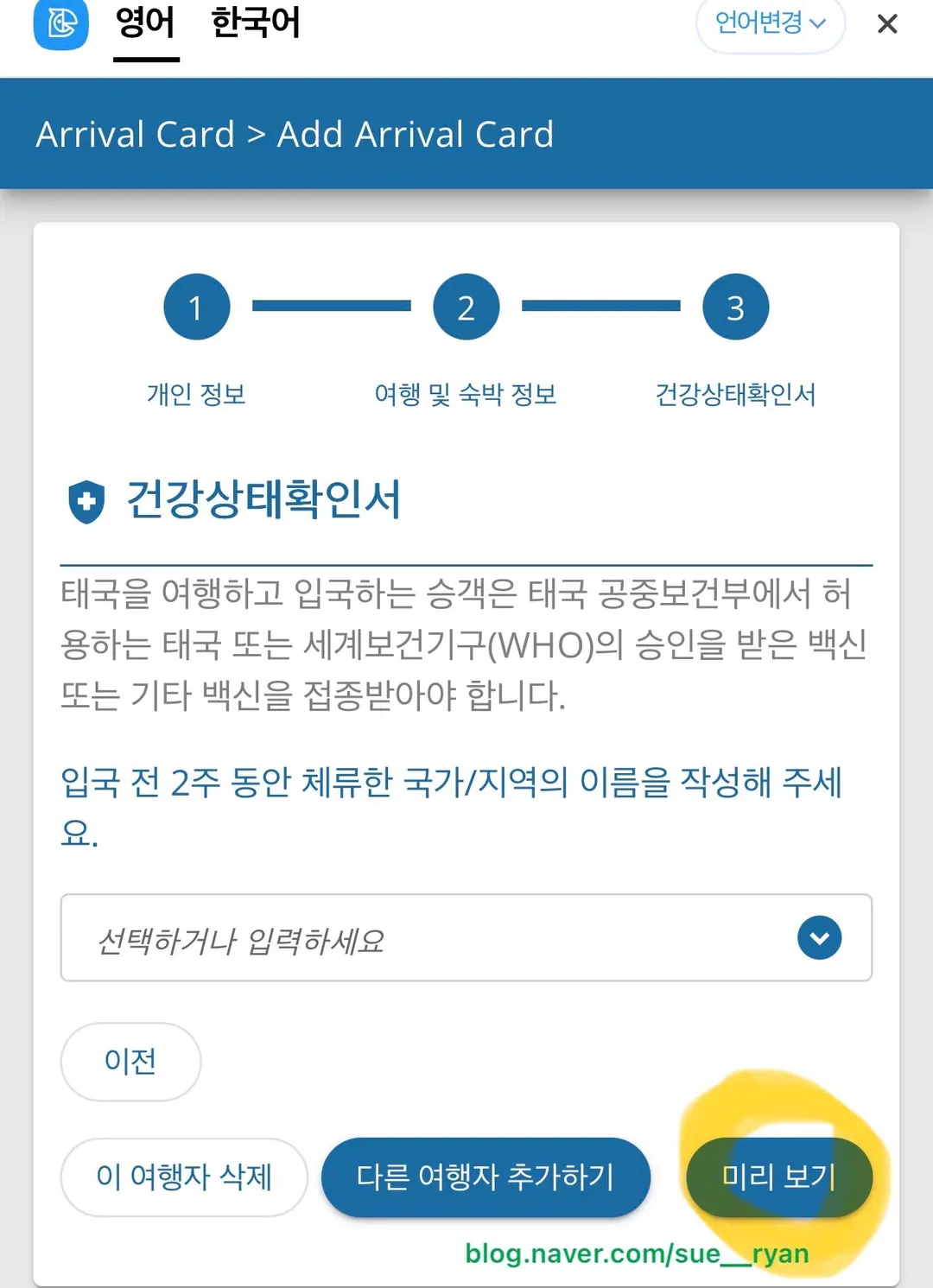
Finally, you'll reach the health declaration section. Click "Preview" on the bottom right to review all the information you've entered one last time.
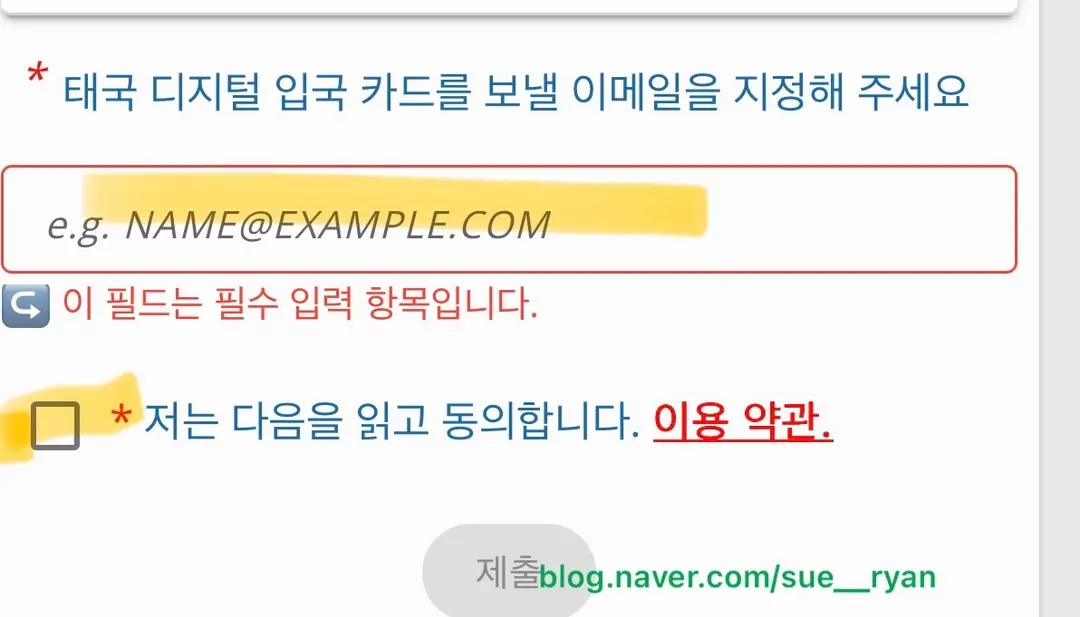
If everything looks correct, enter your email address and agree to the terms. You'll then receive an email containing your QR code. Simply show this QR code to the immigration officer, and you're all set!
The PDF attached to the email, like the one below, is what you'll show to the immigration officer!

3. Essential Tips for the Thailand Digital Arrival Card (TDAC)
Remember, if you haven't completed your arrival card and try to fill it out while waiting in line, you'll likely be asked to step aside. It's truly best to complete it beforehand. Also, we highly recommend getting an eSIM set up in your home country to avoid any last-minute hassles.
⭐️ Get 20% off your eSIM purchase with USIMSA!
Occasionally, an error message might pop up even when all required fields are filled. Don't panic! Just dismiss the pop-up and click "Next" again; it usually lets you proceed. Don't forget to complete your arrival card to ensure a smooth and enjoyable trip to Thailand!
 Supypy (@sue__ryan) • Instagram photos and videos
📍 Chiang Mai
Mueang Chiang Mai District, Chiang Mai, Thailand
Frequently Asked Questions
When does the Thailand Electronic Declaration (TDAC) become mandatory, and who is required to complete it?
Completion of the Thailand Electronic Declaration (TDAC) will be mandatory starting May 1, 2025. All foreign nationals, excluding Thai citizens, must complete it upon entry.
What should I do if I arrive at the airport without completing the Thailand Electronic Declaration (TDAC) in advance?
If you haven't completed it beforehand, you should prepare an eSIM and quickly register it before getting in line. It is recommended to purchase and install an eSIM in Korea before your trip.
Is there a fee to complete the Thailand Electronic Declaration (TDAC)? Also, how many days before arrival can I complete it?
The Thailand Electronic Declaration (TDAC) can be completed free of charge, with no payment required. It can be completed starting three days before your arrival date.
How should I enter my occupation when completing the Thailand Electronic Declaration (TDAC), and what should I do if a pink error pop-up appears?
If your occupation is an office worker, you should enter 'OFFICE WORKER'. Be careful, as 'OFFICIER' refers to a police officer. If a pink error pop-up appears even after filling in all required fields, simply close the pop-up and click 'Next' again to proceed.
Share this article
Featured in Collections
Discover more travel stories curated around the same theme.

Related Travel Stories

Pang Dee Dee Chiang Mai: An Elephant Cafe Near the City in 2026
Discover Pang Dee Dee, Chiang Mai's newest elephant cafe just a 20-minute drive from the city. Enjoy clean facilities, feed elephants, and capture incredible photos.

Chiang Mai Cooking Class Review: Mama Noi Thai Cuisine
Dreaming of authentic Thai cuisine? Our Mama Noi Chiang Mai cooking class review covers everything from market visits to delicious dishes. A must-do experience!

The Lost Book Shop Chiang Mai: Old Town's Hidden Gem
Uncover a literary treasure in Chiang Mai's Old Town! The Lost Book Shop offers a charming escape and unique, affordable souvenirs for every wanderer.

Sense of Haiya Chiang Mai Pool Villa Review 2026: Perfect for Groups
Searching for the perfect group getaway in Chiang Mai? Dive into our review of Sense of Haiya, a luxurious two-story private pool villa ideal for up to six guests without hidden fees.

Horizon Village & Resort Chiang Mai Review 2026: Private Pool Paradise
Discover Horizon Village & Resort Chiang Mai in 2026! This massive, nature-friendly retreat offers serene relaxation and a private pool experience, perfect for your next getaway.

Doi Suthep Chiang Mai Guide 2026: Sunset Views & How to Get There
Planning a trip to Chiang Mai? Don't miss Doi Suthep! This guide reveals the best ways to reach the golden temple and why sunset is the absolute must-see time.