

Visit Japan Web Guide 2026: Fast-Track Your Entry
Planning a trip to Japan for the 2026 cherry blossom season? Learn how to use Visit Japan Web to skip the long airport lines and breeze through immigration.


Hey there! With the warm spring breeze in the air,
I'm Yappi, and I'm currently planning
a cherry blossom tennis trip with my husband! haha 🌸🎾
It feels like absolutely everyone is heading to Japan lately, right?
I actually just got back from a trip to Sapporo this past March!
Especially during the peak cherry blossom season in March and April 2026,
the airports are expected to be busier than ever!
If you're not prepared, you could easily end up standing
in the immigration line for over an hour... 😱
That’s why, to save at least 40 minutes
at airport immigration,
we make absolutely sure
to register for 'Visit Japan Web' before we leave! 👍
I've put together a super simple guide with this ultimate travel hack
that lets you breeze through immigration in just 15 seconds!
📌 What to Prepare Before Registering for Visit Japan Web!
✔️ Passport
✔️ Flight Number (e.g., LJ313)
✔️ Arrival Airport Name
✔️ Your Accommodation Address in Japan
(Simply copy the English or Japanese address from Google Maps!)
✔️ Email Address
Visit Japan Web
How to Register (It's a Website, NOT an App! ❌)
Visit Japan Web | Digital Agency Services
✔️ Sign up with your email
✔️ Enter personal details (passport info)
✔️ Register your entry/exit details
✔️ Fill out the immigration & customs declarations
✔️ Take a screenshot of your QR code
First things first, click the link above
to head to the Visit Japan Web website,
and either create a new account or log in!

1. Click "Your Details" and select "No" for all questions

2. Register Passport Information
If you are entering your details manually,
make sure to type in your last name and first name in English.
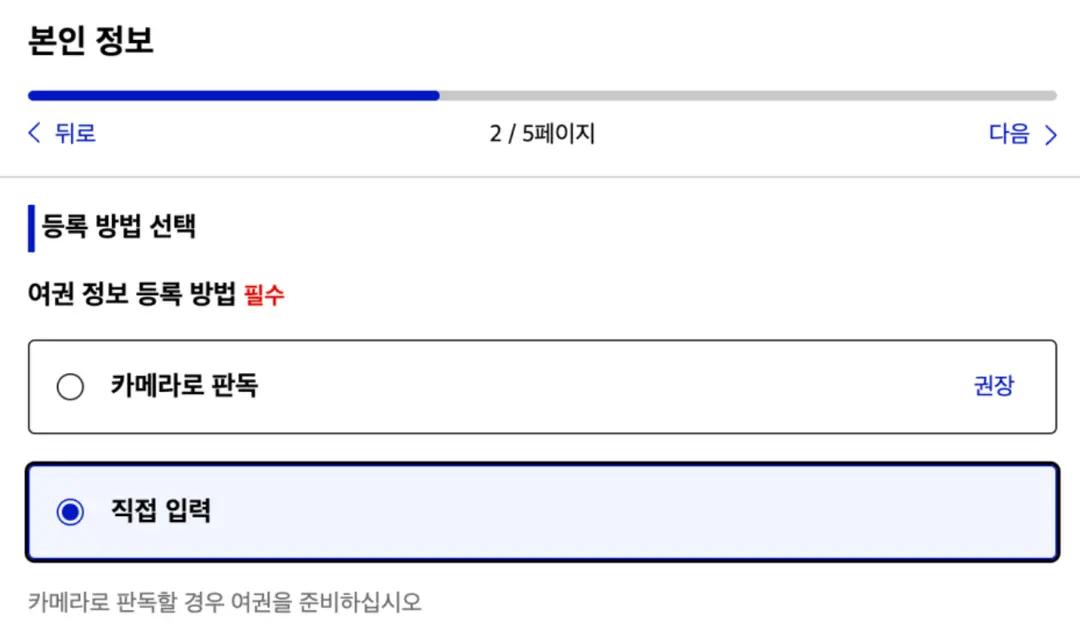
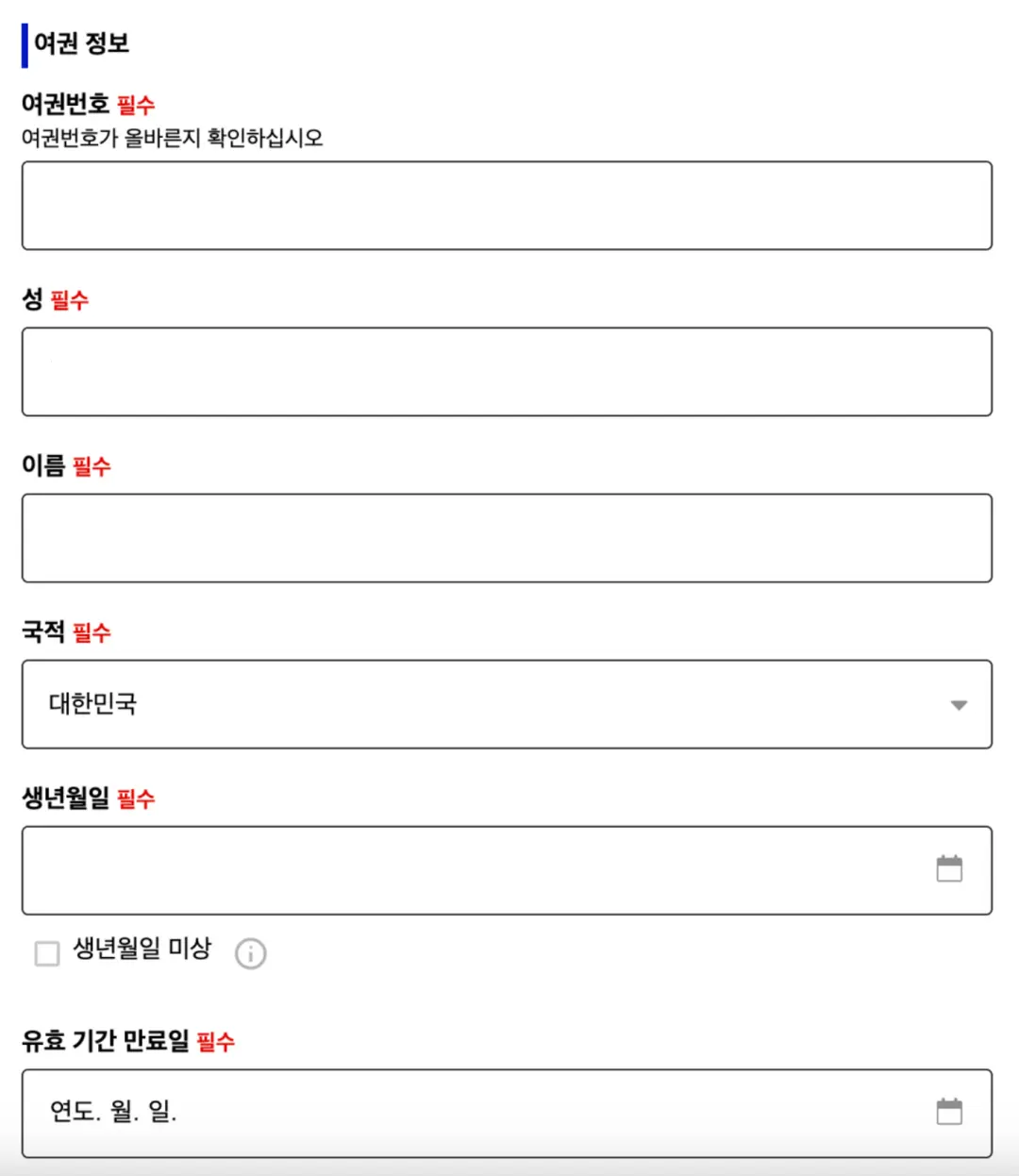
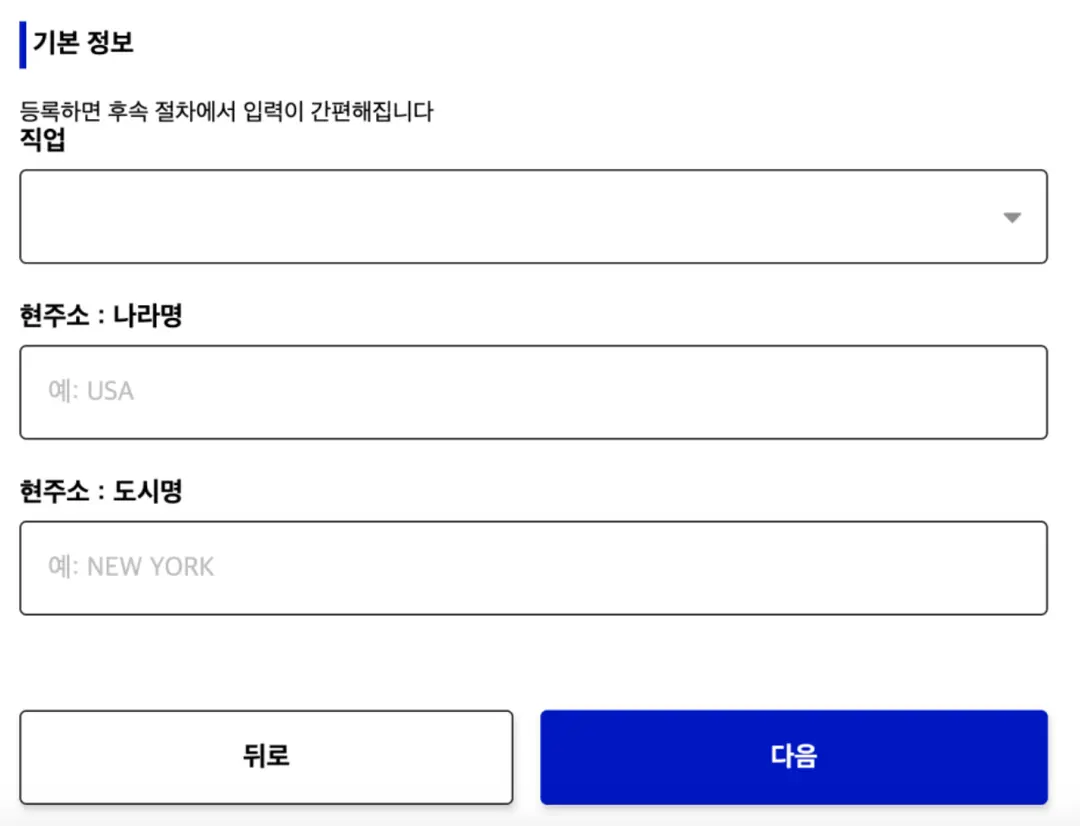
3. Enter Basic Information
Entering your occupation, home country, and city isn't strictly mandatory!
You can write them in English,
but if you're in a hurry, feel free to skip them.
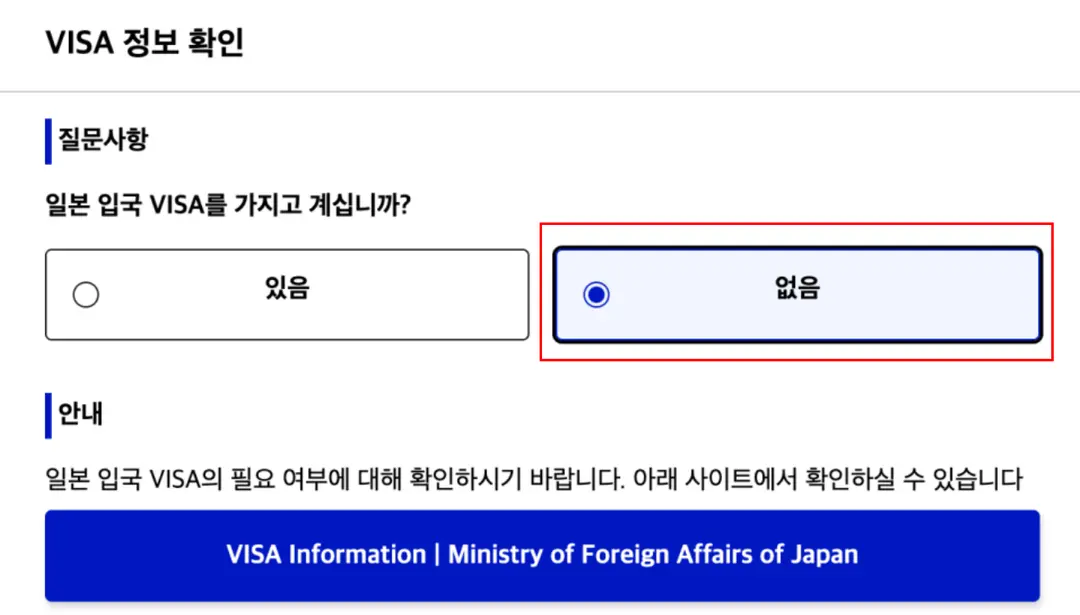
Once you've filled that out,
a VISA Information Confirmation window will pop up.
Simply click [No] (or "No Visa Required") and head back to the home screen!
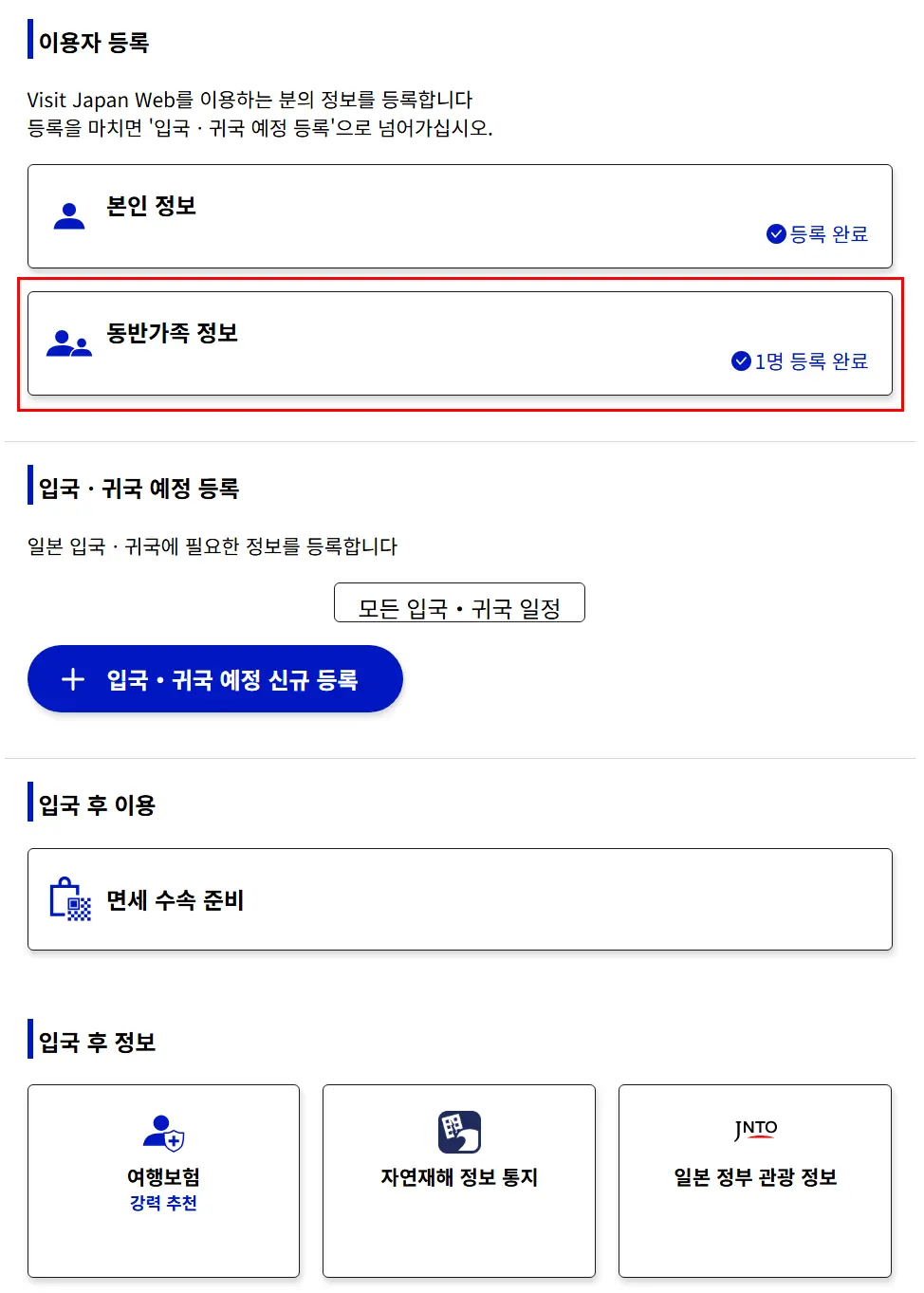
4. Traveling with Family?
You can add your family members' details
so that one person can register everyone all at once!
Just keep in mind that this only applies
if you are entering and leaving the country together on the exact same schedule!
🚨 Even though one person can handle the registration,
immigration checks are still done individually.
Make sure to screenshot each person's QR code
and save them in your phone's photo library!
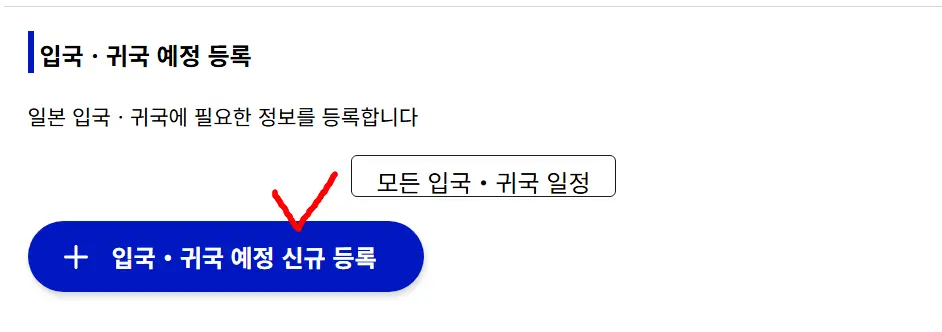
5. Register Your Arrival & Departure Details
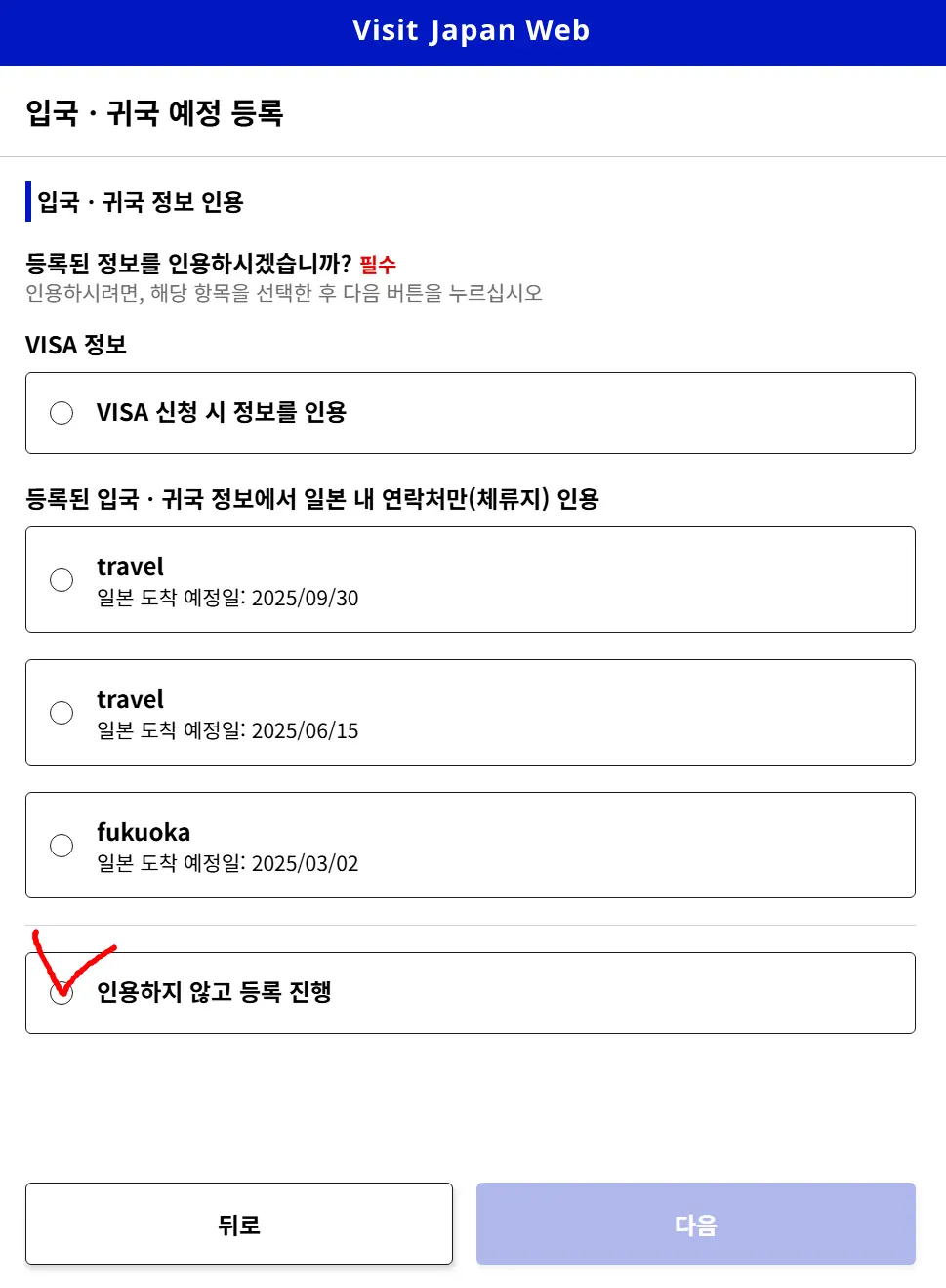
Click "Register New Planned Entry/Return" and select "Proceed to registration without copying details"
If you've been to Japan before, your previous travel info is saved—
so if you're staying at the same place, you can easily reuse it!
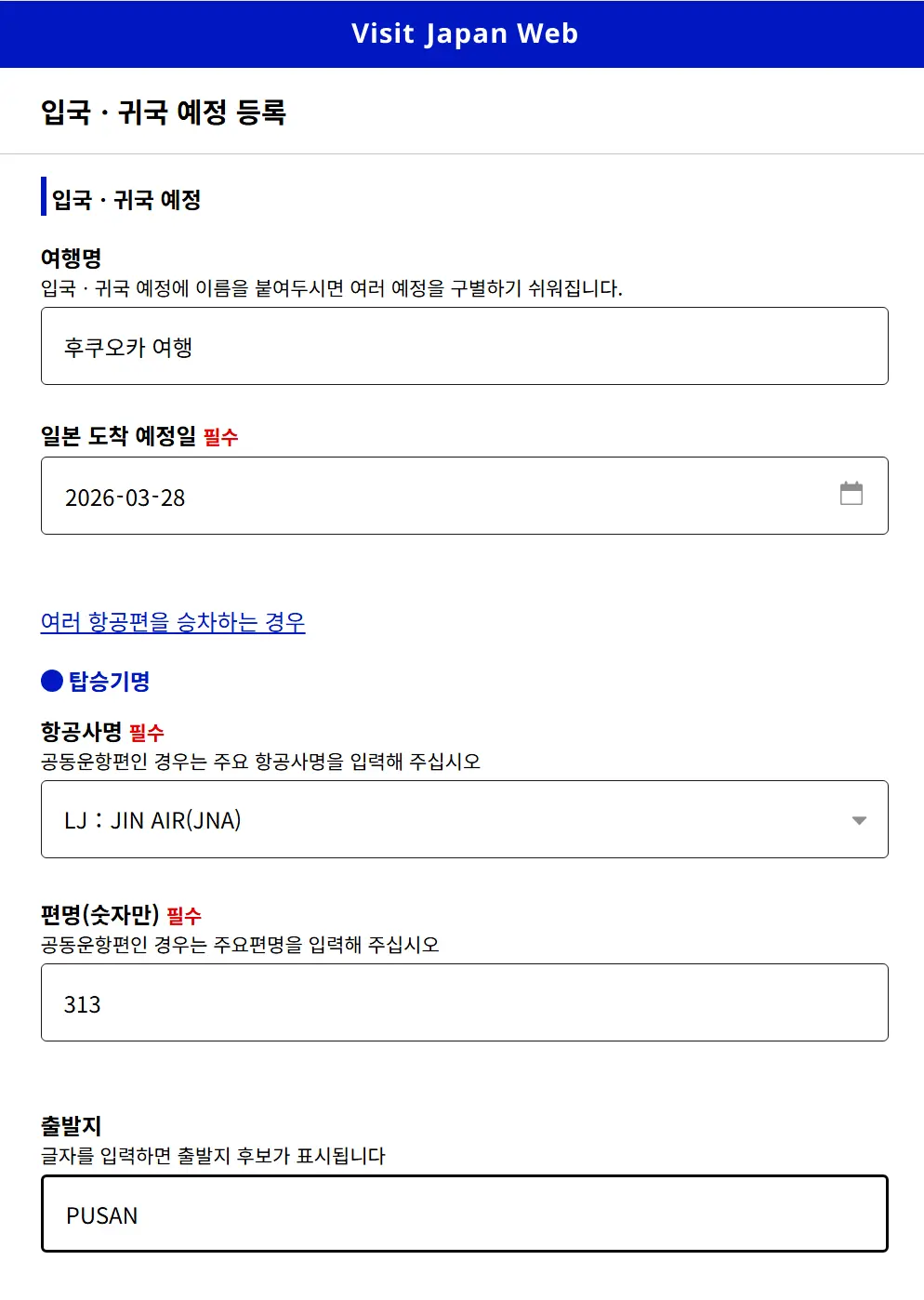
✅ Trip Name: Feel free to name it whatever you like (e.g., Tokyo Spring Trip)
✅ Intended Date of Arrival: The exact date you land in Japan
✅ Point of Embarkation: The city/airport where you board your flight
✅ Airline & Flight Number: Check your flight ticket
6. Address in Japan (Where you are staying)
For your address and contact info in Japan,
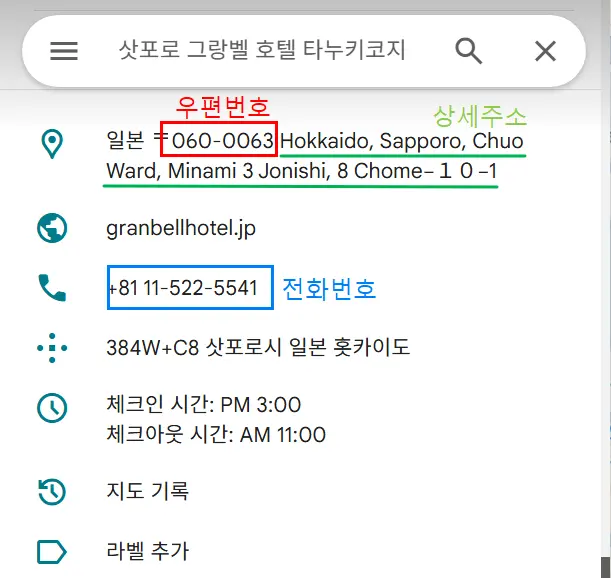
simply search for your booked hotel on Google
and then copy-paste the postal code to auto-fill the address—it's super easy!
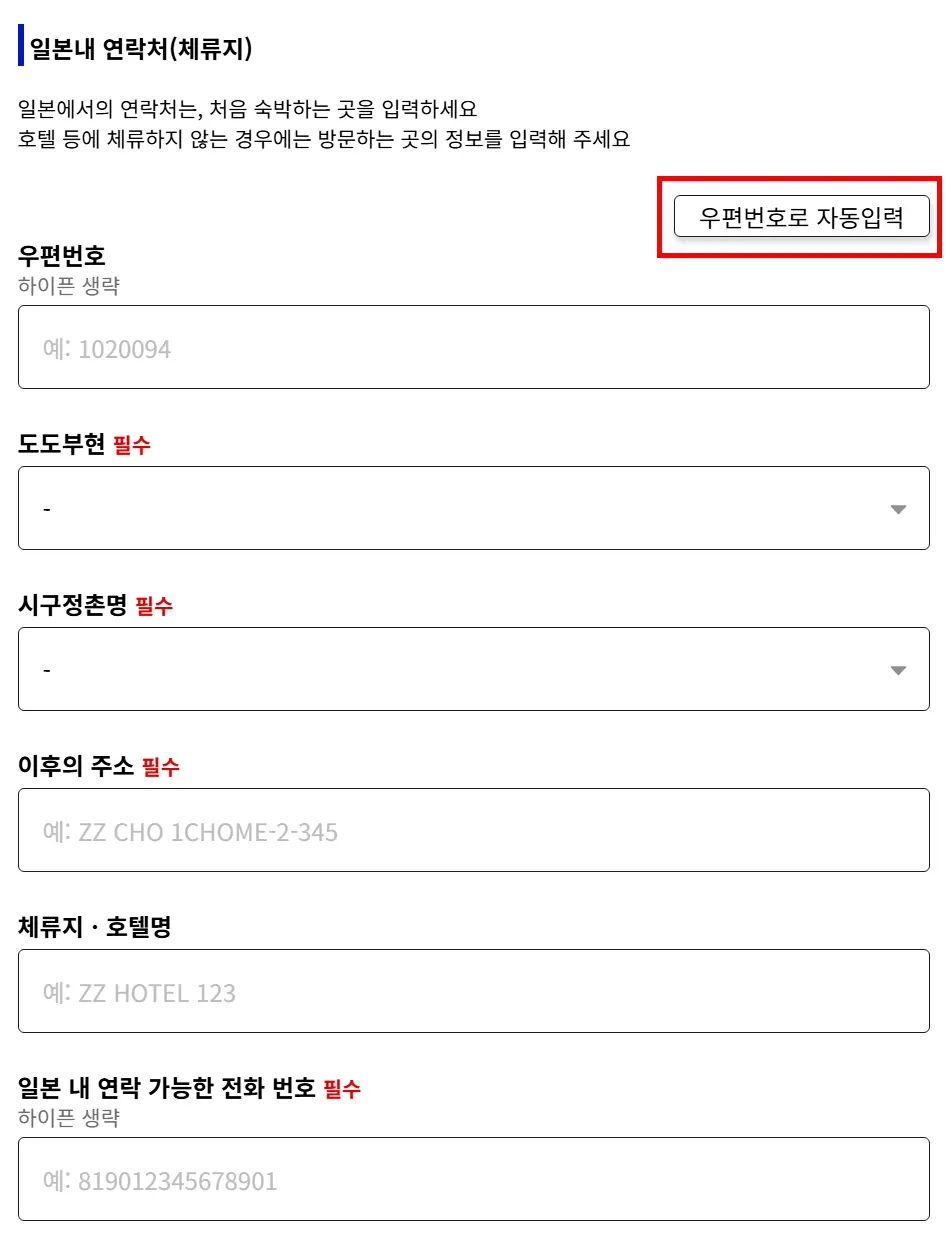
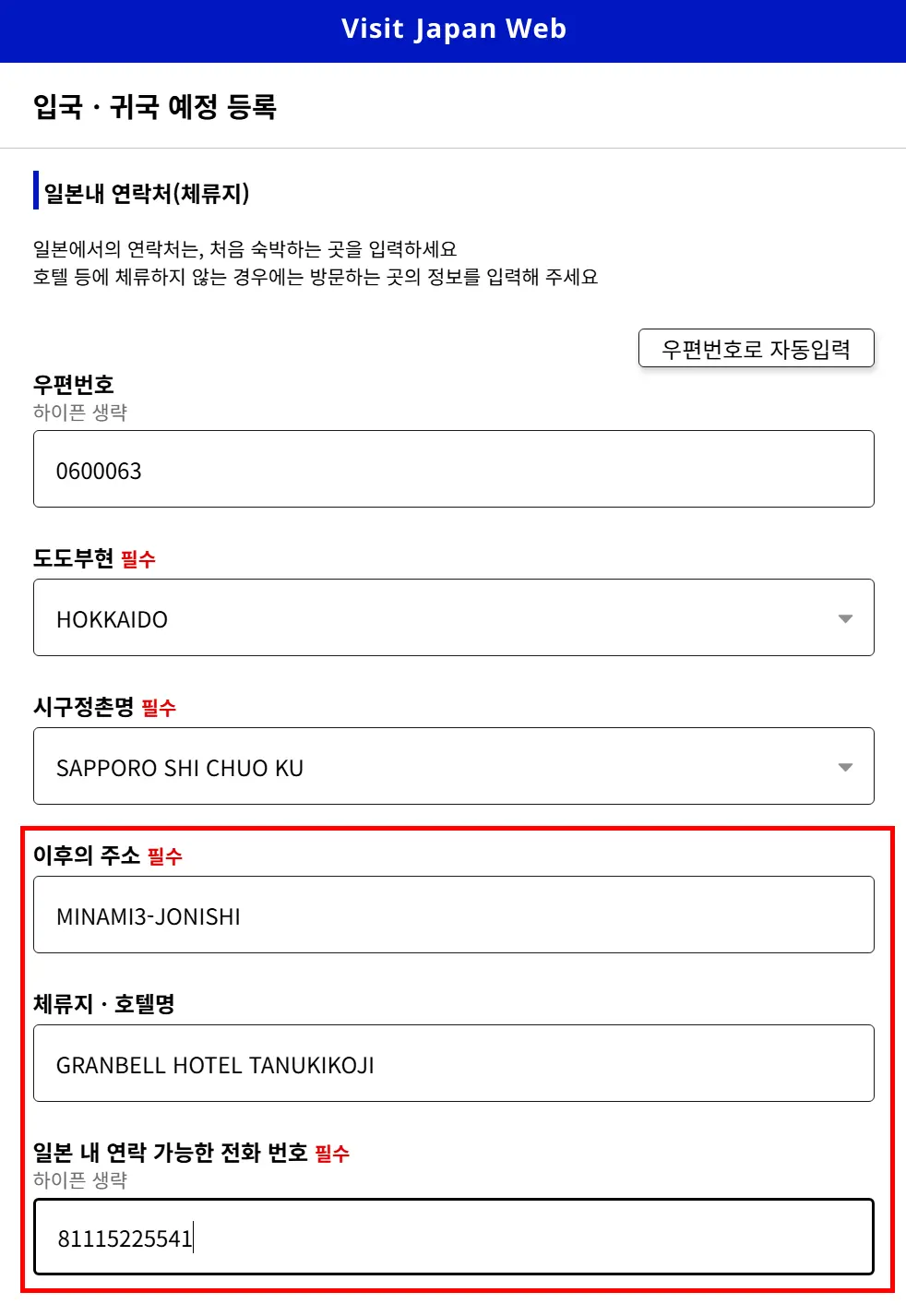
7. Fill in additional details after using [Auto-input by Postal Code]
For the remaining address (detailed address),
you can just copy and paste the rest from Google Maps.
Make sure to enter the hotel name in English,
and though it's optional, you'll need to fill it out anyway,
so it's best to do it all at once!
For the phone number where you can be reached in Japan,
you can simply copy and paste the hotel's phone number.
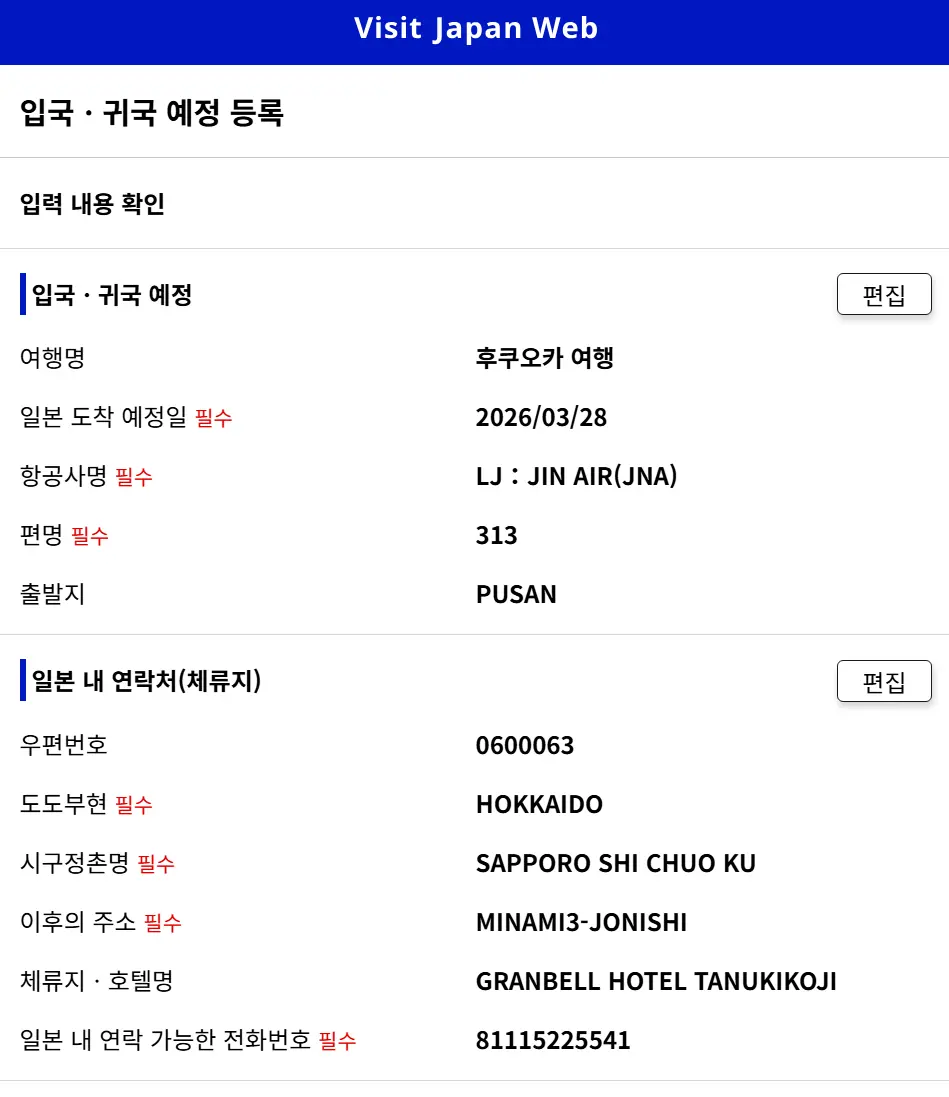
8. Confirm the entered details and click [Register Planned Entry]
If you are traveling with family,
you can select their names all at once.
Once you've done this, return to the main entry/return procedures page.
Completing Immigration & Customs Declaration
1. Immigration Clearance & Customs Declaration
If you select this tab,
all the information you entered earlier will be there!
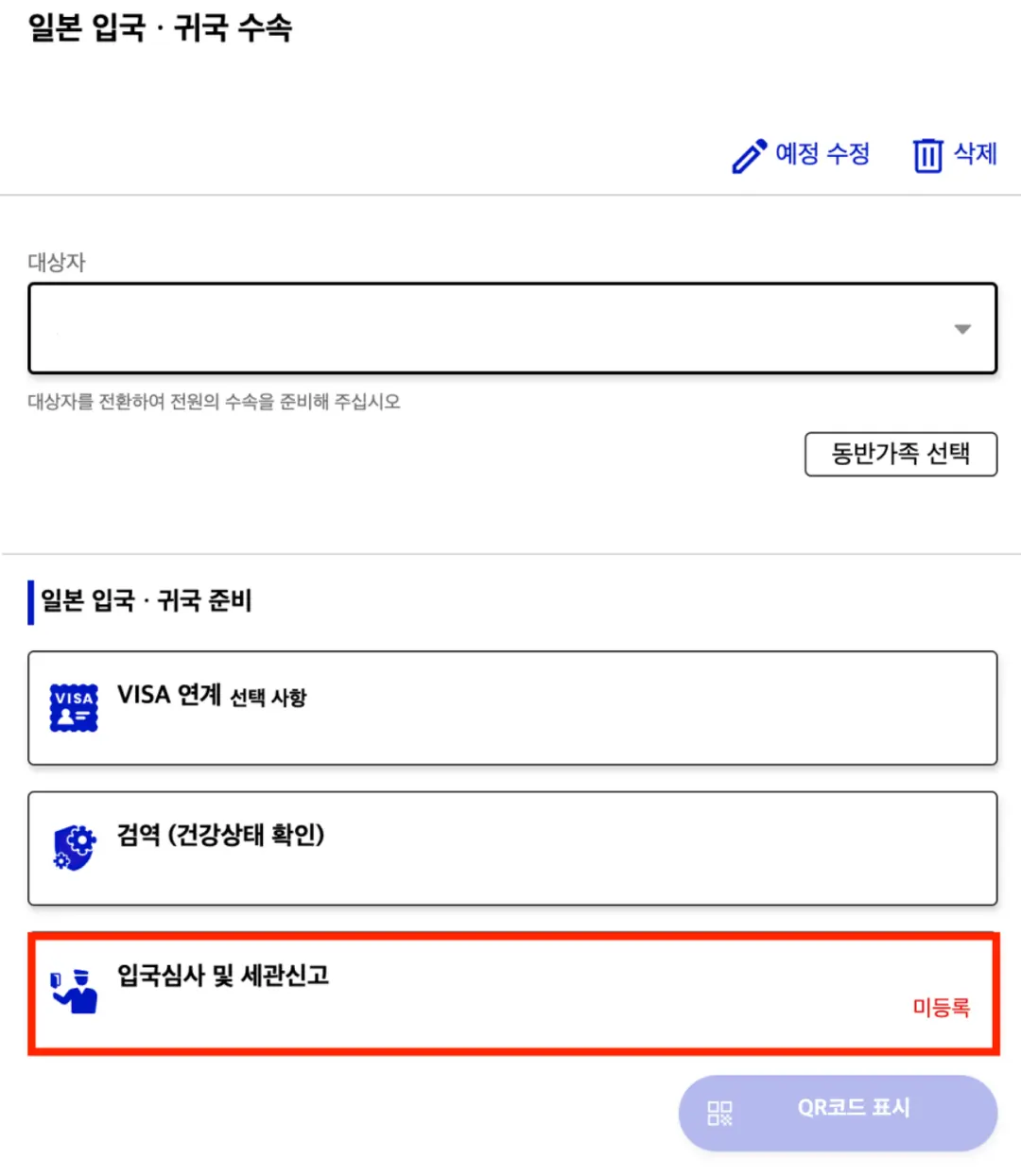
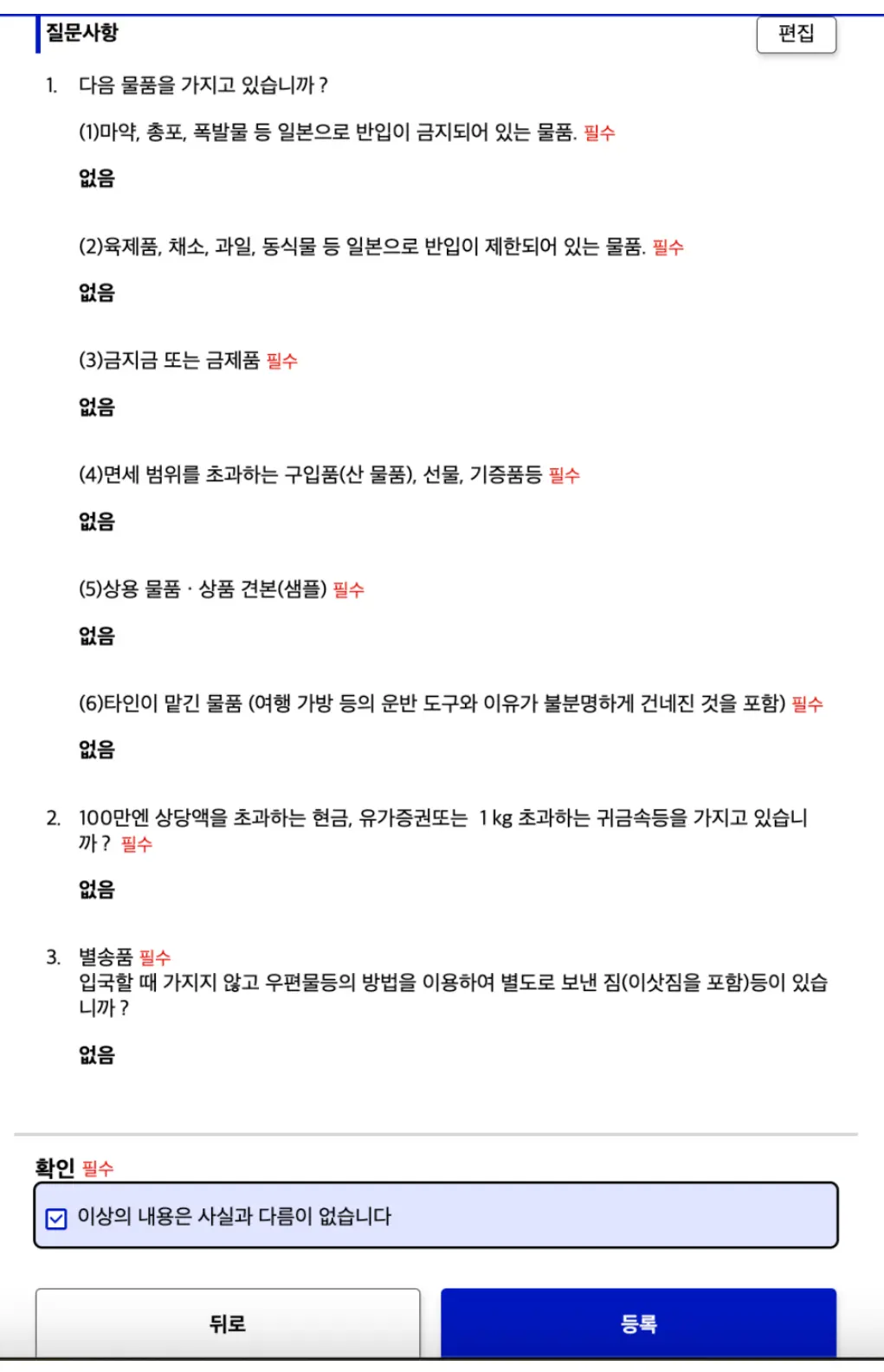
2. Questionnaire Answers
Go through the screens and select [No]
to all the questions regarding narcotics, etc.
Select [No] for the customs declaration items as well.
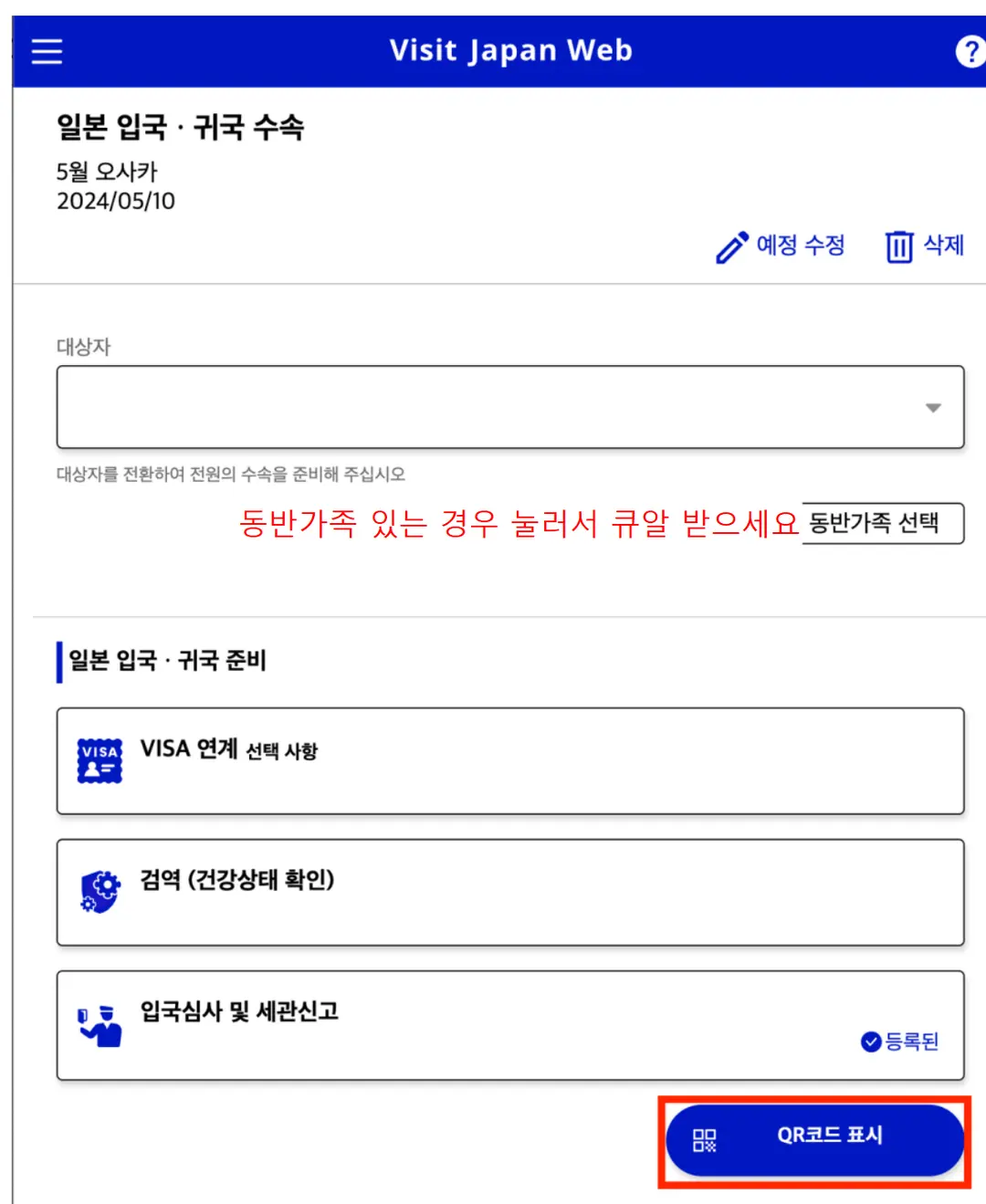
If you have accompanying family members, you can declare them all together.
3. Click "Display QR Code"
Just take a screenshot of each QR code and save it, and you're good to go!
If you're traveling with family,
make sure everyone has their own QR code saved!
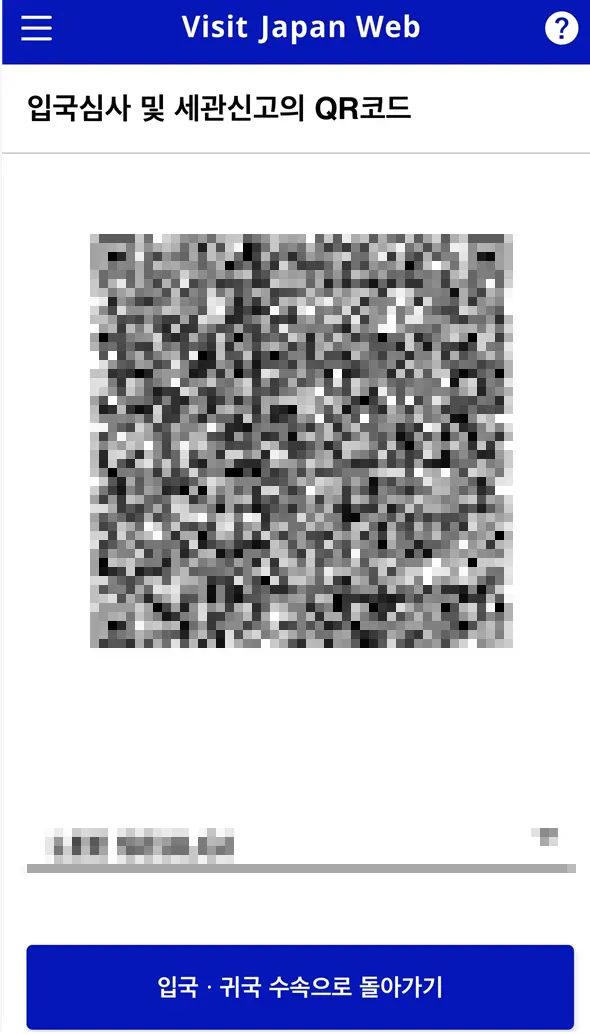
This is what the final screen looks like.
Keep this QR code ready and accessible
until you are completely through immigration!
If you make even a tiny mistake with your English name or passport number
when entering your details, things can get super complicated at the airport!
I highly recommend doing this on a PC website
where you can carefully review everything on a bigger screen!
Once you register, you can load your info for your next trip,
which makes things incredibly convenient!🩷

They say wait times at major airports in Japan during the 2026 cherry blossom season
could reach up to 1 hour and 30 minutes.
Investing just 10 minutes on Visit Japan Web
can save you at least 40 minutes to an hour, so
there's absolutely no reason not to do it, right?
Especially if you're on a short weekend getaway,
it's a total must-do, not an option!~
Get it sorted in advance so you can start your cherry blossom adventure
with a big smile the moment you land!😍🌸
Posts you might also like 👉
Frequently Asked Questions
How much wait time can be saved at immigration by registering on Visit Japan Web during the peak cherry blossom season in March and April 2026?
During the 2026 cherry blossom season, wait times at major Japanese airports can be up to 1 hour and 30 minutes. By registering on Visit Japan Web in advance, you can save at least 40 minutes to an hour at immigration.
Do I need to install a dedicated app to register for Visit Japan Web, and what do I need to prepare?
Visit Japan Web is accessed and registered through a website, not an application. For a smooth registration, you should prepare your passport, flight number, arrival airport name, the English address of your accommodation in Japan, and an email address in advance.
How should I proceed with the Visit Japan Web registration and QR code storage if I have accompanying family members entering at the same time?
If you have the same entry and departure schedule, one person can register everyone at once by adding the accompanying family members' information. However, since immigration checks are conducted individually, you must capture and save a screenshot of the QR code with each person's name on it.
What is the most convenient way to enter the address and contact information of my accommodation in Japan on Visit Japan Web?
The easiest way is to search for your booked hotel on Google Maps, copy the postal code, and use the auto-fill feature. After that, you can simply copy and paste the rest of the detailed address, the English hotel name, and the hotel's phone number from Google Maps.
Share this article
Featured in Collections
Discover more travel stories curated around the same theme.

Related Travel Stories
Haneda Limousine Bus to Shinjuku: 2026 Review
Looking for the easiest way to get from Haneda Airport to Shinjuku? Read our 2026 Haneda Limousine Bus review for booking tips, prices, and boarding guides.
Mt. Fuji Day Tour from Tokyo: Best 2026 Itinerary & Review
Planning a trip to Mount Fuji? This Tokyo day tour review covers the best photo spots, itinerary, and budget tips for an unforgettable 2026 adventure.
Tokyo Metro Pass 2026: Booking & Subway Usage Guide
Maximize your Tokyo adventure in 2026! Learn how to book, exchange, and use the Tokyo Metro Pass to save money and time on unlimited subway rides across the city.

Remm Roppongi Tokyo Review 2026: Affordable Tower Views
Experience the magic of Tokyo with breathtaking Tokyo Tower views from your room at Remm Roppongi. Our honest review reveals why this hotel is a top pick for value.

Harry Potter Studio Tokyo Tickets 2026: Best Deals
Step into the Wizarding World! Here is your complete 2026 guide to booking Harry Potter Studio Tokyo tickets, comparing prices, and maximizing your tour.

Harry Potter Tokyo Tickets 2026: Best Discount Hacks
Planning a trip to the Warner Bros. Studio Tour Tokyo? Learn how to book cheap Harry Potter Tokyo tickets, compare deals, and claim exclusive promo codes!