

Thailand TDAC Arrival Card: 2026 Online Guide
Ready for your Thailand getaway? Avoid airport delays by filling out the Thailand Digital Arrival Card (TDAC) online. Here is our quick 5-minute guide.

Hey there! I'm Nohtrip!
Have you ever traveled to Thailand and ended up huddled in a corner filling out your digital arrival card while everyone else breezed right on through?
Because I definitely have... haha.
So today, I’ve put together this guide to help you zoom through airport immigration as fast as possible!
When planning a trip to Thailand, entry documents can sometimes be way more confusing than booking flights or accommodation.
Lately, submitting the Thailand Digital Arrival Card (TDAC) online instead of the traditional paper arrival card has become the norm.
If it's your first time, you probably have a ton of questions: "When do I fill it out?", "How do I write my address in English?", or "Do I need to print it out?"
That’s why today, I'm going to walk you through a step-by-step guide on how to fill out the Thailand TDAC, making it super easy even for first-time visitors.
I'll also cover the trickiest parts that people often get stuck on, so reading this just once before you fly will make your prep a whole lot smoother!
What to Prepare Before Filling Out the Thailand TDAC
Before diving in, having these details ready to go will make the process incredibly smooth.
Since you'll need to enter your accommodation address in English, I highly recommend having your hotel booking page or Google Maps open and ready.
Step 1: Head to the Official Website
First things first, you need to access the official Thailand Digital Arrival Card (TDAC) portal.
⬇️⬇️⬇️⬇️
If you search "TDAC" online, several sites will pop up. Make sure you are clicking on the official site!
There are third-party agency sites with similar names that might charge you, so it's super important to double-check the URL.
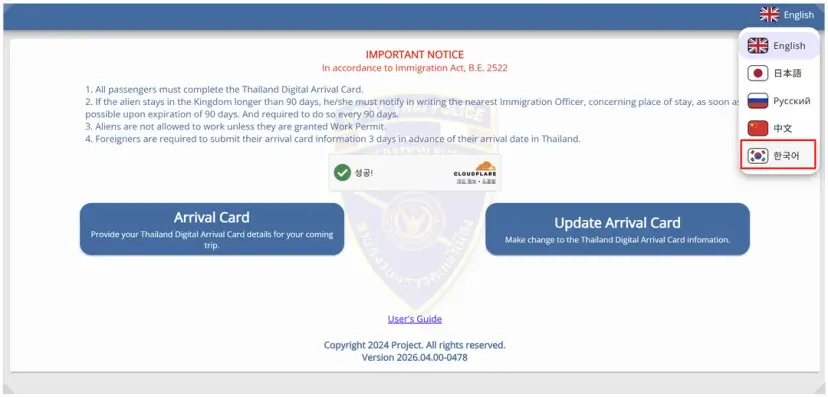
Once you land on the site, make sure the language is set to English!
Then, you'll spot the prominent "Arrival Card" button right on the screen!
Just click on that button to start the registration process.

Step 2: Enter Your Personal Information
Now it's time to enter your passport details.
This section requires your name, nationality, passport number, and so on.
The most crucial part here is making sure the spelling matches your passport exactly.
Even a small mismatch in spacing or the order of your names can lead to hiccups during immigration.
So, the safest bet is to keep your passport open right next to you and copy the details character for character as you fill out the TDAC.
Also, double-check your date of birth format so you don't accidentally swap the month and day!
AND!
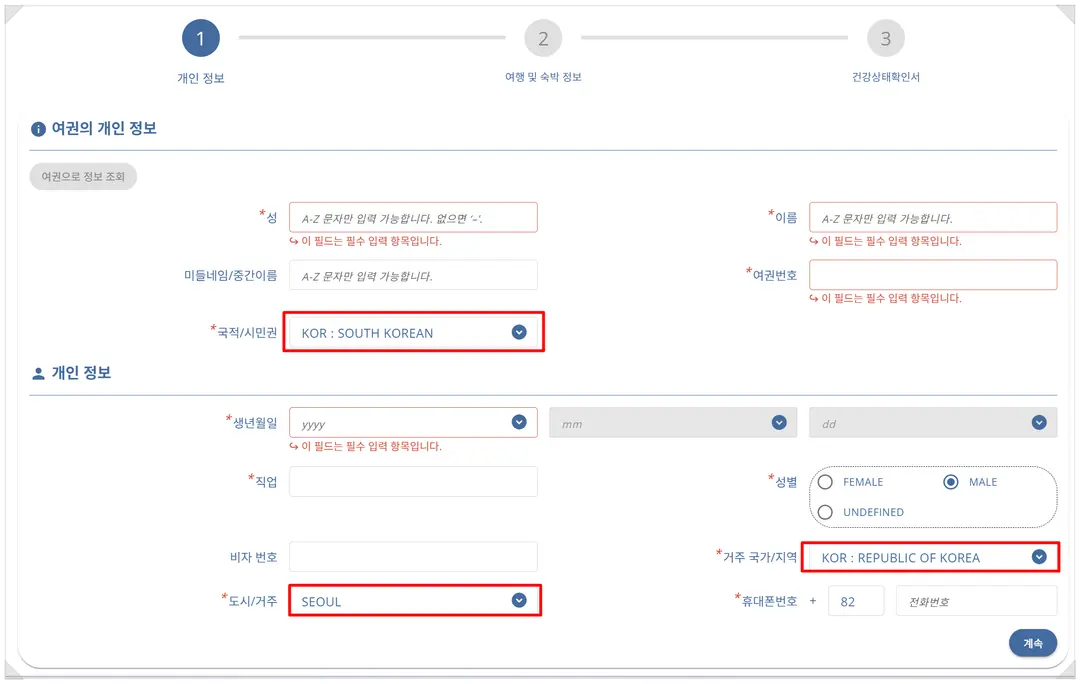
I found myself getting a bit stuck on the Nationality/Citizenship and Occupation fields.
For fields like nationality, if you search "KOREA", you can select options like
SOUTH KOREA
REPUBLIC OF KOREA
as shown in the image above!
And as for your occupation!
I’ve put together a handy table below.
The bolded rows are the most commonly used options, so feel free to use them as a reference!
Occupation | English Term |
Office Worker | Office Worker / Employee |
Public Official | Public Official |
Teacher | Teacher |
Professor | Professor |
Student | Student |
Self-Employed | Self-Employed |
Business Owner | Business Owner |
Freelancer | Freelancer |
Developer | Developer |
Designer | Designer |
Marketer | Marketer |
Nurse | Nurse |
Doctor (의사) | Doctor |
Pharmacist (약사) | Pharmacist |
Housewife (주부) | Housewife |
Unemployed (무직) | Unemployed |
Retired (은퇴) | Retired |
YouTuber (유튜버) | YouTuber |
Flight Attendant (승무원) | Flight Attendant |
Engineer (엔지니어) | Engineer |
Researcher (연구원) | Researcher |
Lawyer (변호사) | Lawyer |
Accountant (회계사) | Accountant |
Soldier (군인) | Soldier |
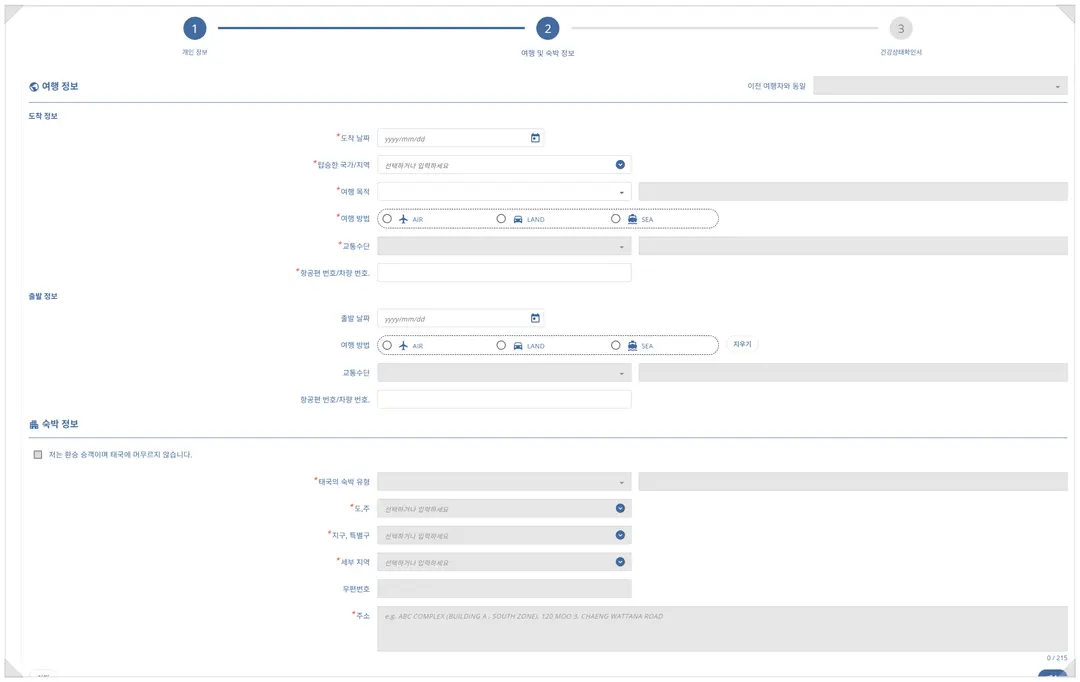
Step 3: Entering Your Travel Details
Next up is entering your travel-related details.
You'll need to input your arrival/departure dates, flight number,
and your accommodation details in Thailand.
It’s super helpful to keep your flight confirmation email and hotel booking details open
on the side to avoid any typos!
In particular, make sure to enter your flight number accurately with both letters and numbers,
just like Korean Air (KE) or Jeju Air (7C).
Also, when filling out Thailand's Digital Arrival Card (TDAC),
entering your accommodation address is key.
Even if you're traveling across multiple cities, it's standard practice
to enter the details of your very first lodging.
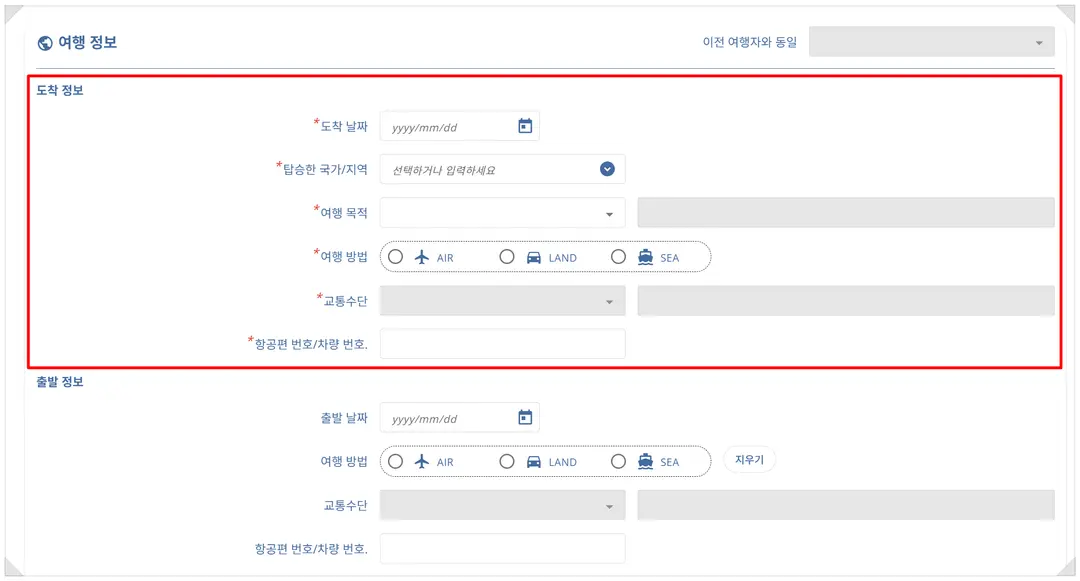
First up is the arrival/departure section!
Just a heads up: Arrival = Arrival Information.
You actually don't need to fill out the departure info—
good to keep in mind!
Arrival Date = Your arrival date in Thailand
Country of Embarkation = KOREA (REPUBLIC OF KOREA)
I’ve mapped out the different purposes of travel in the table below:
English Option | Korean Meaning | Description |
HOLIDAY | Sightseeing / Holiday (관광 / 휴가) | Leisure Travel |
MEETING | Meeting (회의) | Business meeting |
SPORTS | Sports (스포츠) | Participating in or watching sports events |
BUSINESS | Business / Business Trip (사업 / 출장) | Work-related business travel |
INCENTIVE | Incentive Travel (포상 관광) | Company-sponsored incentive trip |
MEDICAL & WELLNESS | Medical & Wellness (의료 / 웰니스) | Medical treatment |
EDUCATION | Education (교육) | Training, education, or academic studies |
CONVENTION | Convention / Academic Conference (컨벤션 / 학회) | Attending seminars, conferences, or official events |
EMPLOYMENT | Employment (취업) | Working or starting a job in Thailand |
EXHIBITION | Exhibition (전시회) | Attending or participating in exhibitions/fairs |
OTHERS (PLEASE SPECIFY) | Others (기타 / 직접 입력) | Write in your specific purpose if not listed above |
Next up is the mode of transport!
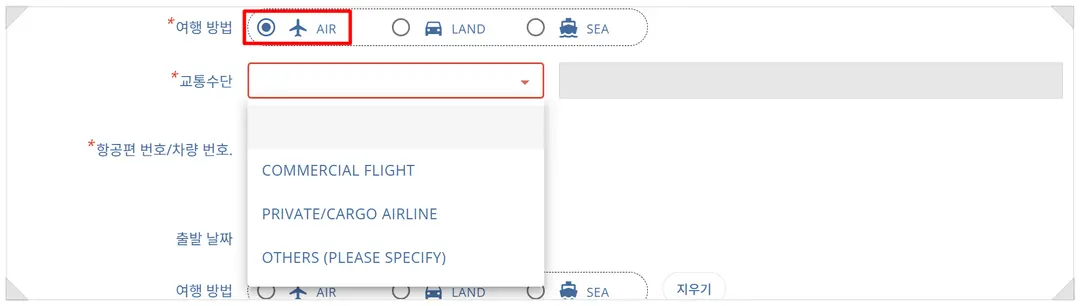
For most of us, choosing the airplane option does the trick!
(Apologies to any seafarers or road-trippers out there! haha)
There are three different transport options available.
If you're flying on a regular commercial airline,
just select COMMERCIAL FLIGHT.
If you happen to be flying on a private jet, the second option is the one for you!
After that, you'll need to enter your accommodation info.
Check out the table below for a quick breakdown of the accommodation types:
Accommodation Type | Meaning |
HOTEL | Hotel (호텔) |
YOUTH HOSTEL | Youth Hostel |
GUEST HOUSE | Guest House |
FRIEND'S HOUSE | Friend's House |
APARTMENT | Apartment / Condo / Airbnb-style Accommodation |
OTHERS (PLEASE SPECIFY) | Others (Direct Input) |
You can use this table as a handy guide!
For the Province/State section, simply select the city you are heading to!
Such as Bangkok, Chiang Mai, Phuket, etc.
Then, just copy and paste the rest of your accommodation address!
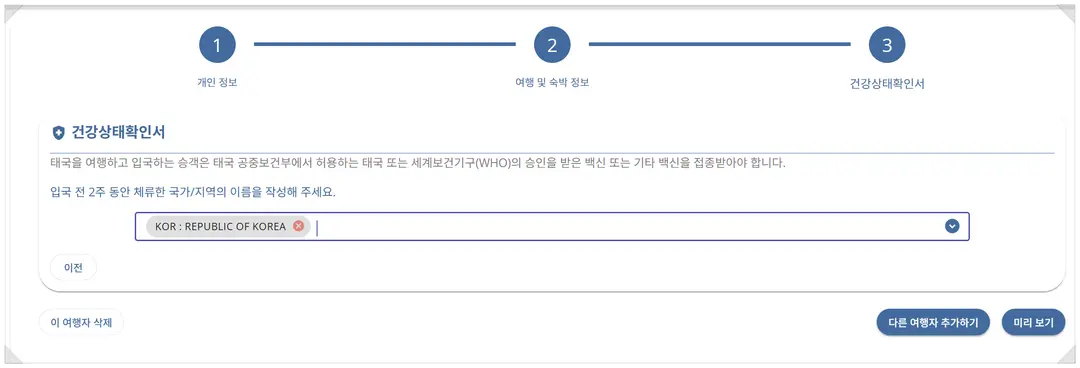
Step 4: Health & Entry Questions Check
Depending on the current regulations, there might be questions
regarding your health status or recently visited countries.
If you select countries with no restrictions,
no extra questions will pop up. Just select the country,
click "Preview" for one final check, and you're good to go!
Step 5: Submit and Save
Once everything is filled out, you'll reach the final submission stage.
After submitting, a download link or confirmation email
will usually be generated.
Make sure to take a screenshot of this page!
For extra peace of mind, saving it as a PDF is highly recommended.
Since airport Wi-Fi can sometimes be patchy,
I strongly suggest saving a copy to your phone and taking a screenshot.
In fact, many travelers find themselves
unable to find their completed Thailand Digital Arrival Card (TDAC) confirmation,
which can lead to some stressful moments at the airport.
Common Mistakes When Filling Out the TDAC
Let's go over some of the most common slip-ups made by first-timers.
Specifically, rushing to fill out your Thailand TDAC
at the airport on your departure day
significantly increases the chance of making a mistake.
It's always best to get it done at least a day in advance!
It might seem a bit overwhelming at first, but once you start,
it's actually pretty straightforward.
As long as you have your passport, flight tickets, and accommodation details handy,
you can easily wrap it up in about 10 minutes.
The most crucial parts are entering your details accurately
and saving your confirmation after submission.
Just keeping these two things in mind will save you
a whole lot of stress at the airport.
If you're planning an upcoming trip to Thailand,
use this guide to fill out your
Thailand Digital Arrival Card (TDAC) ahead of time.
Sorting this out before you leave will make the start of your journey
so much smoother and more relaxing!
If you have any questions, feel free to drop them in the comments below!
Wishing you a wonderful day filled with the joy of travel! :)
Until next time, this has been Nohtrip!
(Written by: Nohtrip_wave, Photos: Nohtrip_wave, Official TDAC)

Frequently Asked Questions
How should I search for and select my nationality on the Thai Digital Arrival Card (TDAC)?
Search for 'KOREA' in the nationality field and select either 'SOUTH KOREA' or 'REPUBLIC OF KOREA' from the list. Make sure it matches your passport information exactly to avoid any issues at immigration.
Do I need to enter departure information for leaving Thailand when filling out the TDAC?
No, you do not need to fill out departure information. You only need to accurately enter your arrival information, such as your arrival date in Thailand and the country you boarded from, in the arrival section.
What mode of transportation should I select on the TDAC if I am flying into Thailand?
If you are taking a regular flight, select 'COMMERCIAL FLIGHT' from the transportation options. If you are using a private jet, you should select the second option.
How should I enter my accommodation address if I am traveling to multiple cities in Thailand, such as Bangkok and Chiang Mai?
Even if you are visiting multiple cities, you should enter the address of your first accommodation. Select the corresponding province/state and enter the detailed address in English.
How should I keep the confirmation screen after submitting the TDAC?
You must take a screenshot of the completion screen or the confirmation email. Since the internet connection at the airport may be unstable, it is recommended to save it as a PDF file and keep it on your mobile device.
Share this article
Featured in Collections
Discover more travel stories curated around the same theme.

Related Travel Stories

Bangkok's Best Techno & House Clubs 2026: Insider Tips for a Wild Night
Ready to hit Bangkok's electrifying techno and house clubs? Find out where to go, what to expect, and essential tips for spots like Culture House, 12x12, and more!

Wat Arun Bangkok Guide 2026: Getting There, Dress Code & Photos
Explore the majestic Wat Arun, Bangkok's Temple of Dawn! Get the latest 2026 info on how to reach this stunning landmark, what to wear, and how to capture memorable photos in traditional Thai attire.

Bangkok Mahanakhon SkyWalk 2026: Day vs. Night Views
Discover the King Power Mahanakhon SkyWalk in Bangkok! Compare day vs. night views, get booking tips, and find out why this iconic skyscraper is a must-visit for breathtaking panoramas in 2026.

La Dotta Bangkok Review 2026: Authentic Italian Pasta & Lunch Set
Discover La Dotta, a casual Italian gem near Bangkok's Sala Daeng BTS. Their weekday lunch set offers excellent value, featuring robust pasta and exquisite tomato sauces. Perfect for travelers craving high-quality Italian fare.

Massilia Bangkok Review 2026: Vintage Vibes & Wood-Fired Pizza
Dive into our 2026 review of Massilia Italian Restaurant in Bangkok. Experience its unique vintage ambiance and decide if its wood-fired pizza and truffle pasta are for you!

Bangkok Itinerary 2026: Rainy Season Indoor Gems & IconSiam
Planning a Bangkok trip in the rainy season? Discover top indoor attractions and a smart eSIM tip to keep your 2026 itinerary smooth, even when downpours hit!