

Sapporo eSIM Guide 2026: Unlimited Data for Japan Travel
Traveling to Japan in 2026? Forget fumbling with physical SIM cards! Discover the game-changing convenience of eSIMs for seamless, unlimited data on your Sapporo adventure.
Japan eSIM
A Game-Changer
Say Goodbye to Physical SIMs
I actually lost my phone on the plane during my last trip to Vietnam, and it was all because I was fumbling around trying to swap out a physical SIM card. Juggling two phones, the process of changing SIMs got a bit complicated, and I completely forgot my secondary phone, leaving it in the seat pocket.
If only I had known about eSIMs sooner, that wouldn't have happened. Well, actually, I did know, but I mistakenly thought my phone model wasn't supported. Turns out, it is!
I thought only Samsung Galaxy Fold and Flip models supported eSIMs, but the S23 series does too. (For iPhones, models 11, XR, and newer are compatible).
So, for my recent trip to Japan, I decided to give it a try. And honestly, it’s an absolute game-changer. Incredibly convenient!
There’s no need to physically manipulate anything; all you do is set it up on your phone. Plus, you can complete the entire setup before even leaving home, which makes it unbelievably easy.
How to Use Your Japan eSIM
>> Japan eSIM Unlimited Data | Softbank / KDDI
>> Japan eSIM | SoftBank 5G / DOCOMO 4G LTE
First, select your destination country. For my Sapporo trip this time, I chose Japan.
There are various data options, starting from 1GB and going up. You can also choose different durations like 7 days or 15 days. Since most of us aren't traveling for a whole month, selecting a plan with 10 gigabytes or more usually feels like unlimited Japan eSIM data, especially when you factor in using hotel Wi-Fi.
Below is an example, but the method of use is generally the same across different platforms.
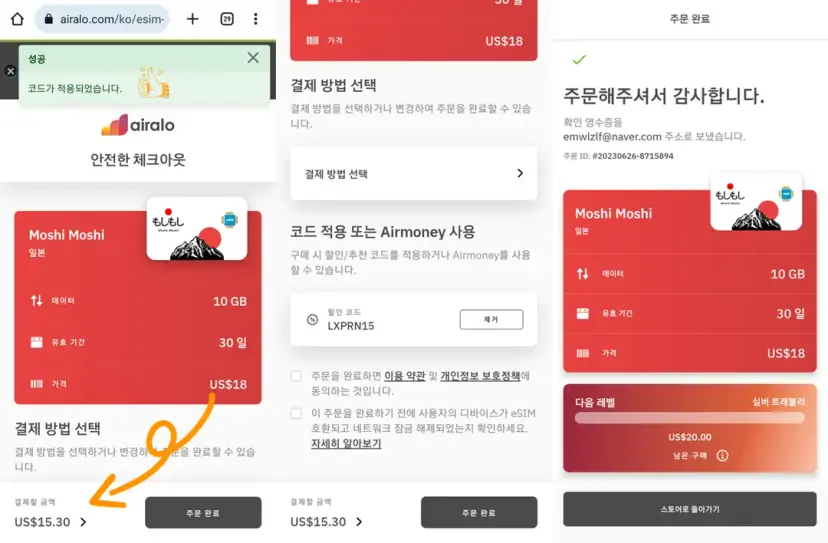
Once your order is complete, you'll immediately find your eSIM details available.
Go into 'Details' >> 'Installation/Data Access', and you'll see a QR code. You'll need to scan this with your phone, so it's best to send it to another phone or access it on a PC.
Next, navigate to your phone's Settings >> Connections >> SIM Manager. Here, you'll find an 'Add eSIM' option.
Tap 'Scan carrier QR code', scan the QR code you obtained earlier, and that's it – your Sapporo eSIM is set up.
It will automatically be added like this. Keep it turned off before departure, and then activate it once you arrive overseas. I switched on my Japan eSIM as soon as I landed at Shin-Chitose Airport.
This way, you can use it like a dual SIM setup. You can use the eSIM for mobile data while abroad, and still receive texts and calls on your original number.
This is incredibly useful because even if you don't answer calls, you'll know who tried to reach you and can message them back through apps. Plus, when you're overseas, there are often times you need to authenticate something, and verification codes usually come via text. With an eSIM, you can receive these codes instantly without needing to swap out your physical SIM – truly convenient!
Of course, you could buy a physical Sapporo SIM card at the local airport,
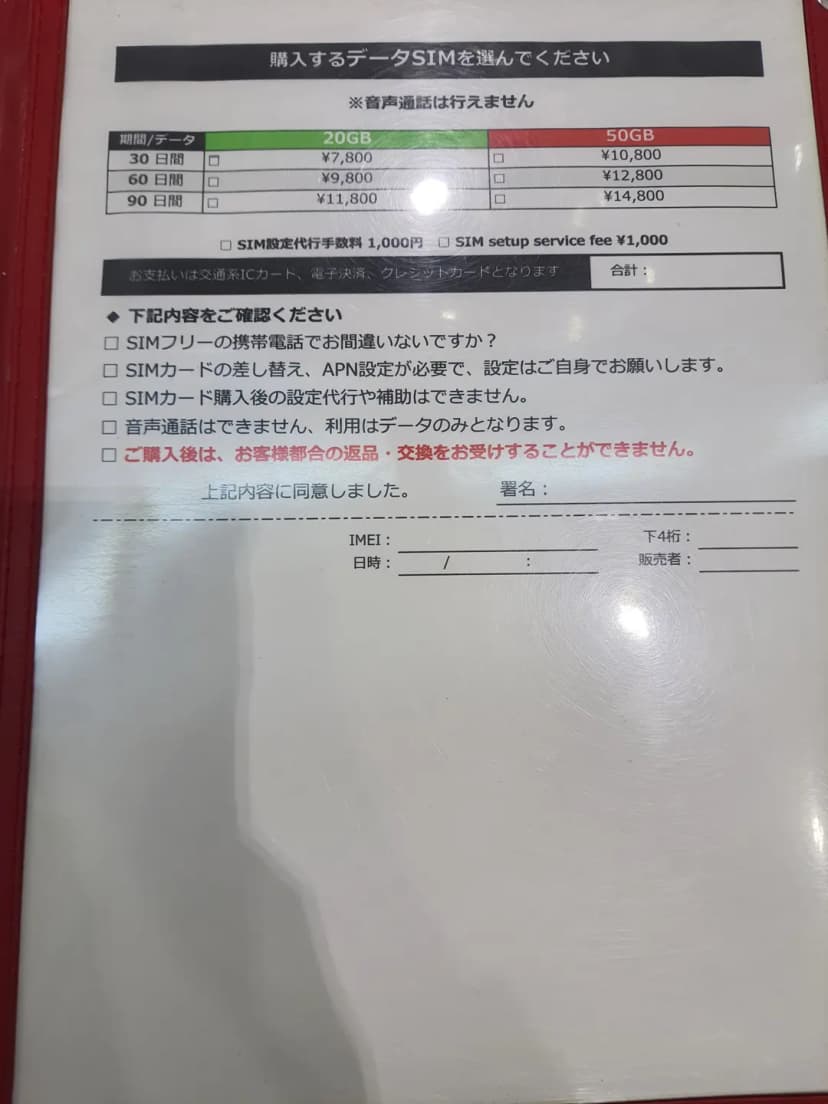
but they tend to be more expensive.
You could also pick up a physical SIM at your home airport and swap it on the plane, but it's a hassle. And if you're as forgetful as me, you might just leave it in your front pocket!
Ultimately, the biggest advantage of a Japan eSIM is the ability to use it simultaneously with your existing SIM, effectively giving you dual SIM functionality.
>> Japan eSIM Unlimited Data | Softbank / KDDI
>> Japan eSIM | SoftBank 5G / DOCOMO 4G LTE
I used it extensively and conveniently throughout my recent Hokkaido trip.
That concludes my review of the Sapporo eSIM (Japan eSIM), which truly opened my eyes to a new world beyond traditional physical SIMs. I plan to use it for all my future travels – it's just that convenient!
Frequently Asked Questions
What phone models are supported for eSIM usage when traveling to Sapporo, Japan?
The article mentions that Galaxy Fold, Flip, and S23 series support eSIM. For iPhones, eSIM can be used on models 11, XR, and later.
What is the specific method for installing a Japan Sapporo eSIM on my phone?
After completing your Japan eSIM order, check the QR code in 'My eSIM'. Display this QR code on another phone or PC, then go to your phone's Settings > Connections > SIM Manager, select 'Add eSIM', and tap 'Scan carrier QR code' to complete the installation.
What is the biggest advantage of using an eSIM when traveling to Sapporo, Japan, compared to a traditional physical SIM?
The biggest advantage of a Japan eSIM is that it can be used simultaneously with your existing physical SIM, like a dual SIM setup. This is extremely convenient as you can use mobile data with the eSIM abroad while still receiving calls or SMS verification codes from Korea on your existing physical SIM without having to switch it out.
Share this article
Featured in Collections
Discover more travel stories curated around the same theme.
Related Travel Stories

Sapporo Biei Furano Bus Tour 2026: Blue Pond & Farm Tomita
Explore the best of Hokkaido's Biei and Furano on a 2026 Sapporo bus tour. Discover the stunning Blue Pond, vibrant Farm Tomita, and Shikisai-no-Oka flower gardens for an unforgettable day trip!

Picante Sapporo Soup Curry Review 2026: A Hokkaido University Gem
Craving authentic soup curry in Sapporo? We explored Picante near Hokkaido University, known for its rich flavors and fresh ingredients. Discover our take on this local favorite!

New Chitose Airport Guide 2026: Souvenirs, Ramen & Tips
Don't rush your departure from New Chitose Airport! Explore duty-free finds, savor authentic Hokkaido ramen, and get insider tips for a smooth and enjoyable exit.

Biei Bus Tour from Sapporo 2026: Ninguru Terrace & Scenic Gems
Hokkaido is packed with incredible sights, and a Biei bus tour from Sapporo is a must! Discover Ninguru Terrace, Blue Pond, and Patchwork Road with insider tips for a seamless adventure.

New Chitose Airport to Sapporo Transportation Guide 2026
Traveling to Sapporo soon? Learn the most convenient ways to reach Sapporo Station or Susukino from New Chitose Airport, whether by train or bus.

New Chitose Airport Guide 2026: Domestic Terminal & Tips
Discover New Chitose Airport's domestic terminal in Sapporo with this 2026 guide. Find shopping, dining, onsen, and crucial tips for navigating to the city center.